Thư viện giao tiếp qua http và https cho Android
https://github.com/loopj/android-async-http/wiki
Tuesday, September 8, 2015

Friday, September 4, 2015
Sử dụng ValueChangeEvent tren Java Server Face
Một ví dụ sử dụng sự kiện ValueChangeEvent trên Face cho các bạn học viên mới tìm hiểu JSF

Chọn loại sản phẩm -> danh sách sản phẩm sẽ được lọc lại:

1. Tạo website sử dụng framework Face 2x (1x cũng được)
2. Định nghĩa 2 ManageBean (Products và Categories) và 2 JavaBean (Product và Category)
3. Thiết kế giao diện trang index.xhtml
Trong ví dụng này tôi sử dụng Netbean để demo
Tạo ManageBean (Products và Categories)
- File -> New File -> Other -> Java Server Face -> JSF ManageBean
Products
[sourcecode language="java"]
package codes;
import java.sql.Connection;
import java.sql.DriverManager;
import java.sql.PreparedStatement;
import java.sql.ResultSet;
import java.util.ArrayList;
import java.util.Collection;
import javax.faces.bean.ManagedBean;
import javax.faces.bean.RequestScoped;
import javax.faces.event.ValueChangeEvent;
/**
*
* @author ntdan
*/
@ManagedBean
@RequestScoped
public class Products {
/**
* Creates a new instance of Products
*/
public Products() {
}
private Collection list;
private int id;
private int cid;
public int getCid() {
return cid;
}
public void setCid(int cid) {
this.cid = cid;
}
private String name;
private String price;
public int getId() {
return id;
}
public void setId(int id) {
this.id = id;
}
public String getName() {
return name;
}
public void setName(String name) {
this.name = name;
}
public String getPrice() {
return price;
}
public void setPrice(String price) {
this.price = price;
}
public Collection getList() {
return list;
}
public void select_cid_change(ValueChangeEvent event)
{
try {
Class.forName("com.microsoft.sqlserver.jdbc.SQLServerDriver");
Connection conn = DriverManager.getConnection("jdbc:sqlserver://172.16.160.81\\sql2008;"
+ "database=northwind;","sa","sa");
PreparedStatement comm = conn.prepareStatement("Select categoryid, productid, productname, unitprice"
+ " from products where categoryID=?");
comm.setInt(1, Integer.parseInt(event.getNewValue().toString()));
ResultSet rs = comm.executeQuery();
list = new ArrayList<Product>();
Product pro;
while(rs.next())
{
pro = new Product();
pro.setId(rs.getInt("productid"));
pro.setcId(rs.getInt("categoryid"));
pro.setName(rs.getString("productname"));
pro.setPrice(rs.getString("unitprice"));
list.add(pro);
}
} catch (Exception e) {
list = null;
}
}
}
[/sourcecode]
Categories
[sourcecode language="java"]
package codes;
import java.sql.Connection;
import java.sql.DriverManager;
import java.sql.PreparedStatement;
import java.sql.ResultSet;
import java.util.ArrayList;
import java.util.Collection;
import javax.faces.bean.ManagedBean;
import javax.faces.bean.RequestScoped;
/**
*
* @author ntdan
*/
@ManagedBean
@RequestScoped
public class Categories {
public Categories() {
}
private int id;
private String name;
public int getId() {
return id;
}
public void setId(int id) {
this.id = id;
}
public String getName() {
return name;
}
public void setName(String name) {
this.name = name;
}
private Collection list;
public Collection getList() {
try {
Class.forName("com.microsoft.sqlserver.jdbc.SQLServerDriver");
Connection conn = DriverManager.getConnection("jdbc:sqlserver://172.16.160.81\\sql2008;"
+ "database=northwind;", "sa", "sa");
PreparedStatement comm = conn.prepareStatement("Select categoryid, categoryname"
+ " from categories");
ResultSet rs = comm.executeQuery();
list = new ArrayList<Category>();
Category ca;
while (rs.next()) {
ca = new Category();
ca.setId(rs.getInt("categoryid"));
ca.setName(rs.getString("categoryname"));
list.add(ca);
}
} catch (Exception e) {
list = null;
}
return list;
}
}
[/sourcecode]
Tạo 2 javabean như sau
- File -> New File -> Java Class
Product
[sourcecode language="java"]
package codes;
public class Product {
public Product() {
}
private int id;
private int cId;
private String name;
private String price;
public int getId() {
return id;
}
public void setId(int id) {
this.id = id;
}
public int getcId() {
return cId;
}
public void setcId(int cId) {
this.cId = cId;
}
public String getName() {
return name;
}
public void setName(String name) {
this.name = name;
}
public String getPrice() {
return price;
}
public void setPrice(String price) {
this.price = price;
}
}
[/sourcecode]
Category
[sourcecode language="java"]
package codes;
public class Category {
public Category() {
}
private int id;
private String name;
public int getId() {
return id;
}
public void setId(int id) {
this.id = id;
}
public String getName() {
return name;
}
public void setName(String name) {
this.name = name;
}
}
[/sourcecode]
Thiết kế giao diện xhtml
[sourcecode language="html"]
<?xml version='1.0' encoding='UTF-8' ?>
<!DOCTYPE html PUBLIC "-//W3C//DTD XHTML 1.0 Transitional//EN" "http://www.w3.org/TR/xhtml1/DTD/xhtml1-transitional.dtd">
<html xmlns="http://www.w3.org/1999/xhtml"
xmlns:h="http://xmlns.jcp.org/jsf/html"
xmlns:f="http://xmlns.jcp.org/jsf/core">
<h:head>
<title>Value Change Event</title>
<link type="text/css" rel="stylesheet" href="//codeproject.cachefly.net/App_Themes/CodeProject/Css/Main.min.css?dt=2.8.150901.1"></link>
</h:head>
<h:body>
<f:view>
<h:form>
Categories:<br/>
<h:selectOneMenu onchange="submit();"
value="#{products.cid}"
valueChangeListener="#{products.select_cid_change}">
<f:selectItems value="#{categories.list}" var="sate"
itemLabel="#{sate.name}"
itemValue="#{sate.id}"/>
</h:selectOneMenu>
<h:dataTable border="1" id="t" width="100%"
value="#{products.list}" var="product">
<h:column>
<f:facet name="header">
ID
</f:facet>
<h:outputText value="#{product.id}"/>
</h:column>
<h:column>
<f:facet name="header">
Name
</f:facet>
<h:outputText value="#{product.name}"/>
</h:column>
<h:column>
<f:facet name="header">
Price
</f:facet>
<h:outputText value="#{product.price}"/>
</h:column>
<h:column>
<f:facet name="header">
Operation
</f:facet>
<h:commandLink value="Delete" action="index"/>
</h:column>
</h:dataTable>
</h:form>
</f:view>
</h:body>
</html>
[/sourcecode]
f:selectItems: sẽ render các phần tử (thẻ option của HTML) cho hộp chọn (thẻ select của HTML) với nội dung giữa thẻ option là tên nhóm sản phẩm (itemLabel="#{sate.name}") và thuộc tính value của option sẽ được điền mã nhóm (itemValue="#{sate.id}").
Mỗi khi chọn một phần tử trong hộp chọn sự kiện onchange sẽ phát sinh (HTML), chúng ta có thể đón nhận sự kiện này dưới ManageBean qua thuộc tính valueChangeListener="#{products.select_cid_change}" của selectOneMenu để xử lý sự kiên và cập nhật lại danh sách sản phẩm.
Mã nguồn tham khảo --> ở đây

Chọn loại sản phẩm -> danh sách sản phẩm sẽ được lọc lại:

1. Tạo website sử dụng framework Face 2x (1x cũng được)
2. Định nghĩa 2 ManageBean (Products và Categories) và 2 JavaBean (Product và Category)
3. Thiết kế giao diện trang index.xhtml
Trong ví dụng này tôi sử dụng Netbean để demo
Tạo ManageBean (Products và Categories)
- File -> New File -> Other -> Java Server Face -> JSF ManageBean
Products
[sourcecode language="java"]
package codes;
import java.sql.Connection;
import java.sql.DriverManager;
import java.sql.PreparedStatement;
import java.sql.ResultSet;
import java.util.ArrayList;
import java.util.Collection;
import javax.faces.bean.ManagedBean;
import javax.faces.bean.RequestScoped;
import javax.faces.event.ValueChangeEvent;
/**
*
* @author ntdan
*/
@ManagedBean
@RequestScoped
public class Products {
/**
* Creates a new instance of Products
*/
public Products() {
}
private Collection list;
private int id;
private int cid;
public int getCid() {
return cid;
}
public void setCid(int cid) {
this.cid = cid;
}
private String name;
private String price;
public int getId() {
return id;
}
public void setId(int id) {
this.id = id;
}
public String getName() {
return name;
}
public void setName(String name) {
this.name = name;
}
public String getPrice() {
return price;
}
public void setPrice(String price) {
this.price = price;
}
public Collection getList() {
return list;
}
public void select_cid_change(ValueChangeEvent event)
{
try {
Class.forName("com.microsoft.sqlserver.jdbc.SQLServerDriver");
Connection conn = DriverManager.getConnection("jdbc:sqlserver://172.16.160.81\\sql2008;"
+ "database=northwind;","sa","sa");
PreparedStatement comm = conn.prepareStatement("Select categoryid, productid, productname, unitprice"
+ " from products where categoryID=?");
comm.setInt(1, Integer.parseInt(event.getNewValue().toString()));
ResultSet rs = comm.executeQuery();
list = new ArrayList<Product>();
Product pro;
while(rs.next())
{
pro = new Product();
pro.setId(rs.getInt("productid"));
pro.setcId(rs.getInt("categoryid"));
pro.setName(rs.getString("productname"));
pro.setPrice(rs.getString("unitprice"));
list.add(pro);
}
} catch (Exception e) {
list = null;
}
}
}
[/sourcecode]
Categories
[sourcecode language="java"]
package codes;
import java.sql.Connection;
import java.sql.DriverManager;
import java.sql.PreparedStatement;
import java.sql.ResultSet;
import java.util.ArrayList;
import java.util.Collection;
import javax.faces.bean.ManagedBean;
import javax.faces.bean.RequestScoped;
/**
*
* @author ntdan
*/
@ManagedBean
@RequestScoped
public class Categories {
public Categories() {
}
private int id;
private String name;
public int getId() {
return id;
}
public void setId(int id) {
this.id = id;
}
public String getName() {
return name;
}
public void setName(String name) {
this.name = name;
}
private Collection list;
public Collection getList() {
try {
Class.forName("com.microsoft.sqlserver.jdbc.SQLServerDriver");
Connection conn = DriverManager.getConnection("jdbc:sqlserver://172.16.160.81\\sql2008;"
+ "database=northwind;", "sa", "sa");
PreparedStatement comm = conn.prepareStatement("Select categoryid, categoryname"
+ " from categories");
ResultSet rs = comm.executeQuery();
list = new ArrayList<Category>();
Category ca;
while (rs.next()) {
ca = new Category();
ca.setId(rs.getInt("categoryid"));
ca.setName(rs.getString("categoryname"));
list.add(ca);
}
} catch (Exception e) {
list = null;
}
return list;
}
}
[/sourcecode]
Tạo 2 javabean như sau
- File -> New File -> Java Class
Product
[sourcecode language="java"]
package codes;
public class Product {
public Product() {
}
private int id;
private int cId;
private String name;
private String price;
public int getId() {
return id;
}
public void setId(int id) {
this.id = id;
}
public int getcId() {
return cId;
}
public void setcId(int cId) {
this.cId = cId;
}
public String getName() {
return name;
}
public void setName(String name) {
this.name = name;
}
public String getPrice() {
return price;
}
public void setPrice(String price) {
this.price = price;
}
}
[/sourcecode]
Category
[sourcecode language="java"]
package codes;
public class Category {
public Category() {
}
private int id;
private String name;
public int getId() {
return id;
}
public void setId(int id) {
this.id = id;
}
public String getName() {
return name;
}
public void setName(String name) {
this.name = name;
}
}
[/sourcecode]
Thiết kế giao diện xhtml
[sourcecode language="html"]
<?xml version='1.0' encoding='UTF-8' ?>
<!DOCTYPE html PUBLIC "-//W3C//DTD XHTML 1.0 Transitional//EN" "http://www.w3.org/TR/xhtml1/DTD/xhtml1-transitional.dtd">
<html xmlns="http://www.w3.org/1999/xhtml"
xmlns:h="http://xmlns.jcp.org/jsf/html"
xmlns:f="http://xmlns.jcp.org/jsf/core">
<h:head>
<title>Value Change Event</title>
<link type="text/css" rel="stylesheet" href="//codeproject.cachefly.net/App_Themes/CodeProject/Css/Main.min.css?dt=2.8.150901.1"></link>
</h:head>
<h:body>
<f:view>
<h:form>
Categories:<br/>
<h:selectOneMenu onchange="submit();"
value="#{products.cid}"
valueChangeListener="#{products.select_cid_change}">
<f:selectItems value="#{categories.list}" var="sate"
itemLabel="#{sate.name}"
itemValue="#{sate.id}"/>
</h:selectOneMenu>
<h:dataTable border="1" id="t" width="100%"
value="#{products.list}" var="product">
<h:column>
<f:facet name="header">
ID
</f:facet>
<h:outputText value="#{product.id}"/>
</h:column>
<h:column>
<f:facet name="header">
Name
</f:facet>
<h:outputText value="#{product.name}"/>
</h:column>
<h:column>
<f:facet name="header">
Price
</f:facet>
<h:outputText value="#{product.price}"/>
</h:column>
<h:column>
<f:facet name="header">
Operation
</f:facet>
<h:commandLink value="Delete" action="index"/>
</h:column>
</h:dataTable>
</h:form>
</f:view>
</h:body>
</html>
[/sourcecode]
f:selectItems: sẽ render các phần tử (thẻ option của HTML) cho hộp chọn (thẻ select của HTML) với nội dung giữa thẻ option là tên nhóm sản phẩm (itemLabel="#{sate.name}") và thuộc tính value của option sẽ được điền mã nhóm (itemValue="#{sate.id}").
Mỗi khi chọn một phần tử trong hộp chọn sự kiện onchange sẽ phát sinh (HTML), chúng ta có thể đón nhận sự kiện này dưới ManageBean qua thuộc tính valueChangeListener="#{products.select_cid_change}" của selectOneMenu để xử lý sự kiên và cập nhật lại danh sách sản phẩm.
Mã nguồn tham khảo --> ở đây
Wednesday, September 2, 2015
Thursday, August 27, 2015
Strut1_login_MultiLanguage_ValidateByJavaScript
Trang index.jsp

Souce
[sourcecode language="html"]
<%@page import="java.util.Locale"%>
<%@ taglib prefix="c" uri="http://java.sun.com/jsp/jstl/core" %>
<%@taglib prefix="bean" uri="/WEB-INF/struts-bean.tld" %>
<%@page contentType="text/html" pageEncoding="UTF-8"%>
<!DOCTYPE html>
<html>
<head>
<meta http-equiv="Content-Type" content="text/html; charset=UTF-8">
<title><bean:message key="HomeTitle"/></title>
</head>
<script type="text/javascript">
function change(code)
{
document.getElementById('code').value = code;
document.forms[0].submit();
}
</script>
<body>
<div align="center">
<h1><bean:message key="SelectLanguage"/></h1>
<c:set var="cLang" scope="request"
value="${requestScope.locale.language}}"/>
<c:if test="${not empty param.code}">
<c:set var="cLang" scope="request" value="${param.code}"/>
</c:if>
<c:if test="${not empty param.code}">
<c:set value='<%= new Locale(request.getAttribute("cLang") + "")%>'
var="org.apache.struts.action.LOCALE" scope="session"/>
<c:redirect url="login.jsp"/>
</c:if>
<form method="POST">
<input type="hidden" id="code" name="code" value=""/>
<img src="vn.svg.png" width="32px"
onclick="change('vi');"/>
<img src="us.svg.png" width="32px"
onclick="change('en');"/>
</form>
</div>
</body>
</html>
[/sourcecode]
Chức năng chứng thực với giao diện tiếng Việt và tiếng anh


Source
[sourcecode language="html"]
<%@page contentType="text/html" pageEncoding="UTF-8"%>
<%@taglib prefix="html" uri="/WEB-INF/struts-html.tld" %>
<%@taglib prefix="bean" uri="/WEB-INF/struts-bean.tld" %>
<link rel="stylesheet" type="text/css"
href="http://codeproject.com/App_Themes/CodeProject/Css/Main.min.css">
<!DOCTYPE html>
<html:html>
<html:link href="index.jsp">
<bean:message key="HomeTitle"/>
</html:link>
<html:form action="/Login">
<table>
<tr>
<td colspan="2">
<font color="red">
<ol>
<html:errors header="Errors"/>
</ol>
</font>
</td>
</tr>
<tr>
<td><bean:message key="UserNameLabel"/></td>
<td><html:text property="userName"/> </td>
</tr>
<tr>
<td><bean:message key="PasswordLabel"/></td>
<td><html:text property="password"/></td>
</tr>
<tr>
<td></td>
<td><html:submit>
<bean:message key="LoginKey"/>
</html:submit>
</td>
</tr>
</table>
</html:form>
</html:html>
[/sourcecode]
Tạo thêm một số key cho resource file như sau

Hiểu chỉnh lại actionForm của trang login như sau
[sourcecode language="java"]
package codes;
import javax.servlet.http.HttpServletRequest;
import org.apache.struts.action.ActionErrors;
import org.apache.struts.action.ActionMapping;
import org.apache.struts.action.ActionMessage;
public class frmLogin extends org.apache.struts.action.ActionForm {
private String userName;
private String password;
public frmLogin() {
super();
userName ="admin";
password ="admin";
}
public ActionErrors validate(ActionMapping mapping, HttpServletRequest request) {
ActionErrors errors = new ActionErrors();
if (getUserName() == null || getUserName().length() < 1) {
errors.add("username", new ActionMessage("username"));
}
if (getPassword() == null || getPassword().length() < 1) {
errors.add("password", new ActionMessage("password"));
}
return errors;
}
public String getUserName() {
return userName;
}
public void setUserName(String userName) {
this.userName = userName;
}
public String getPassword() {
return password;
}
public void setPassword(String password) {
this.password = password;
}
}
[/sourcecode]
Chạy giao diện trang login.jsp và xóa rỗng 2 textfield, nhấn nút login chúng ta có như sau


Như vậy là căn bản chúng ta đã có thể thay đổi được giao diên (ngôn ngữ) với strut1x. Tuy nhiên, các cách kiểm tra này không hiệu quả khi phải gởi đi rồi nhận về lỗi thông báo. Phần tiếp theo chúng ta sẽ kiểm tra và thông báo với javascript
Strut1 cung cấp cho chúng ta co chế tạo action form động với lớp org.apache.struts.validator.DynaValidatorForm.
Bổ sung thêm vào giữa thẻ trong file struts-config.xml nội dung sau để tạo form
[sourcecode language="xml"]
<form-bean name="addForm" type="org.apache.struts.validator.DynaValidatorForm">
<form-property name="username" type="java.lang.String"/>
<form-property name="password" type="java.lang.String"/>
</form-bean>
[/sourcecode]
Tiếp tục mở file validation.xml trong thư mục WEB_INF và thêm vào nội dung sau:
[sourcecode language="xml"]
<formset>
<form name="addForm">
<field
property="username"
depends="required">
<arg key="logonForm.username"/>
</field>
<field
property="password"
depends="required,mask">
<arg key="logonForm.password"/>
<var>
<var-name>mask</var-name>
<var-value>^[0-9a-zA-Z]*$</var-value>
</var>
</field>
</form>
</formset>
[/sourcecode]
Đến đây, chúng ta sẽ tạo view với trang add.jsp như sau:
[sourcecode language="html"]
<%--
Document : add
Created on : Aug 25, 2015, 3:08:26 PM
Author : ntdan
--%>
<%@page contentType="text/html" pageEncoding="UTF-8"%>
<%@taglib prefix="html" uri="/WEB-INF/struts-html.tld" %>
<%@taglib prefix="bean" uri="/WEB-INF/struts-bean.tld" %>
<!DOCTYPE html>
<html>
<head>
<meta http-equiv="Content-Type" content="text/html; charset=UTF-8">
<link rel="stylesheet" type="text/css"
href="http://codeproject.com/App_Themes/CodeProject/Css/Main.min.css">
<title>JSP Page</title>
</head>
<body>
<h1>Register!</h1>
<html:form action="/AddAction"
onsubmit="validateAddForm(this);">
<html:javascript formName="addForm"/>
Username:<br/>
<html:text property="username"/><br/>
Password:<br/>
<html:password property="password"/><br/>
<html:submit><bean:message key="btnAdd"/> </html:submit>
</html:form>
</body>
</html>
[/sourcecode]
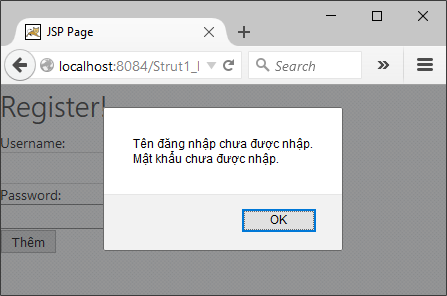
Chạy trang add.jsp và xóa rỗng hai textfield và nhấn nút Thêm chúng ta co giao diện như sau;


Ok như vậy là chúng ta đã có thể kết hợp js để thông báo và khai thác tài nguyên để đa ngôn ngữ cho giao viện trang web trên nền strut1 rồi.
Để có thể hiểu rõ hơn có thể tham khảo mã nguồn ở đây hay trao đổi với tôi.
Mã nguồn ở đây

Souce
[sourcecode language="html"]
<%@page import="java.util.Locale"%>
<%@ taglib prefix="c" uri="http://java.sun.com/jsp/jstl/core" %>
<%@taglib prefix="bean" uri="/WEB-INF/struts-bean.tld" %>
<%@page contentType="text/html" pageEncoding="UTF-8"%>
<!DOCTYPE html>
<html>
<head>
<meta http-equiv="Content-Type" content="text/html; charset=UTF-8">
<title><bean:message key="HomeTitle"/></title>
</head>
<script type="text/javascript">
function change(code)
{
document.getElementById('code').value = code;
document.forms[0].submit();
}
</script>
<body>
<div align="center">
<h1><bean:message key="SelectLanguage"/></h1>
<c:set var="cLang" scope="request"
value="${requestScope.locale.language}}"/>
<c:if test="${not empty param.code}">
<c:set var="cLang" scope="request" value="${param.code}"/>
</c:if>
<c:if test="${not empty param.code}">
<c:set value='<%= new Locale(request.getAttribute("cLang") + "")%>'
var="org.apache.struts.action.LOCALE" scope="session"/>
<c:redirect url="login.jsp"/>
</c:if>
<form method="POST">
<input type="hidden" id="code" name="code" value=""/>
<img src="vn.svg.png" width="32px"
onclick="change('vi');"/>
<img src="us.svg.png" width="32px"
onclick="change('en');"/>
</form>
</div>
</body>
</html>
[/sourcecode]
Chức năng chứng thực với giao diện tiếng Việt và tiếng anh


Source
[sourcecode language="html"]
<%@page contentType="text/html" pageEncoding="UTF-8"%>
<%@taglib prefix="html" uri="/WEB-INF/struts-html.tld" %>
<%@taglib prefix="bean" uri="/WEB-INF/struts-bean.tld" %>
<link rel="stylesheet" type="text/css"
href="http://codeproject.com/App_Themes/CodeProject/Css/Main.min.css">
<!DOCTYPE html>
<html:html>
<html:link href="index.jsp">
<bean:message key="HomeTitle"/>
</html:link>
<html:form action="/Login">
<table>
<tr>
<td colspan="2">
<font color="red">
<ol>
<html:errors header="Errors"/>
</ol>
</font>
</td>
</tr>
<tr>
<td><bean:message key="UserNameLabel"/></td>
<td><html:text property="userName"/> </td>
</tr>
<tr>
<td><bean:message key="PasswordLabel"/></td>
<td><html:text property="password"/></td>
</tr>
<tr>
<td></td>
<td><html:submit>
<bean:message key="LoginKey"/>
</html:submit>
</td>
</tr>
</table>
</html:form>
</html:html>
[/sourcecode]
Tạo thêm một số key cho resource file như sau

Hiểu chỉnh lại actionForm của trang login như sau
[sourcecode language="java"]
package codes;
import javax.servlet.http.HttpServletRequest;
import org.apache.struts.action.ActionErrors;
import org.apache.struts.action.ActionMapping;
import org.apache.struts.action.ActionMessage;
public class frmLogin extends org.apache.struts.action.ActionForm {
private String userName;
private String password;
public frmLogin() {
super();
userName ="admin";
password ="admin";
}
public ActionErrors validate(ActionMapping mapping, HttpServletRequest request) {
ActionErrors errors = new ActionErrors();
if (getUserName() == null || getUserName().length() < 1) {
errors.add("username", new ActionMessage("username"));
}
if (getPassword() == null || getPassword().length() < 1) {
errors.add("password", new ActionMessage("password"));
}
return errors;
}
public String getUserName() {
return userName;
}
public void setUserName(String userName) {
this.userName = userName;
}
public String getPassword() {
return password;
}
public void setPassword(String password) {
this.password = password;
}
}
[/sourcecode]
Chạy giao diện trang login.jsp và xóa rỗng 2 textfield, nhấn nút login chúng ta có như sau


Như vậy là căn bản chúng ta đã có thể thay đổi được giao diên (ngôn ngữ) với strut1x. Tuy nhiên, các cách kiểm tra này không hiệu quả khi phải gởi đi rồi nhận về lỗi thông báo. Phần tiếp theo chúng ta sẽ kiểm tra và thông báo với javascript
Strut1 cung cấp cho chúng ta co chế tạo action form động với lớp org.apache.struts.validator.DynaValidatorForm.
Bổ sung thêm vào giữa thẻ trong file struts-config.xml nội dung sau để tạo form
[sourcecode language="xml"]
<form-bean name="addForm" type="org.apache.struts.validator.DynaValidatorForm">
<form-property name="username" type="java.lang.String"/>
<form-property name="password" type="java.lang.String"/>
</form-bean>
[/sourcecode]
Tiếp tục mở file validation.xml trong thư mục WEB_INF và thêm vào nội dung sau:
[sourcecode language="xml"]
<formset>
<form name="addForm">
<field
property="username"
depends="required">
<arg key="logonForm.username"/>
</field>
<field
property="password"
depends="required,mask">
<arg key="logonForm.password"/>
<var>
<var-name>mask</var-name>
<var-value>^[0-9a-zA-Z]*$</var-value>
</var>
</field>
</form>
</formset>
[/sourcecode]
Đến đây, chúng ta sẽ tạo view với trang add.jsp như sau:
[sourcecode language="html"]
<%--
Document : add
Created on : Aug 25, 2015, 3:08:26 PM
Author : ntdan
--%>
<%@page contentType="text/html" pageEncoding="UTF-8"%>
<%@taglib prefix="html" uri="/WEB-INF/struts-html.tld" %>
<%@taglib prefix="bean" uri="/WEB-INF/struts-bean.tld" %>
<!DOCTYPE html>
<html>
<head>
<meta http-equiv="Content-Type" content="text/html; charset=UTF-8">
<link rel="stylesheet" type="text/css"
href="http://codeproject.com/App_Themes/CodeProject/Css/Main.min.css">
<title>JSP Page</title>
</head>
<body>
<h1>Register!</h1>
<html:form action="/AddAction"
onsubmit="validateAddForm(this);">
<html:javascript formName="addForm"/>
Username:<br/>
<html:text property="username"/><br/>
Password:<br/>
<html:password property="password"/><br/>
<html:submit><bean:message key="btnAdd"/> </html:submit>
</html:form>
</body>
</html>
[/sourcecode]
Chạy trang add.jsp và xóa rỗng hai textfield và nhấn nút Thêm chúng ta co giao diện như sau;

Ok như vậy là chúng ta đã có thể kết hợp js để thông báo và khai thác tài nguyên để đa ngôn ngữ cho giao viện trang web trên nền strut1 rồi.
Để có thể hiểu rõ hơn có thể tham khảo mã nguồn ở đây hay trao đổi với tôi.
Mã nguồn ở đây
Wednesday, August 26, 2015
Thursday, August 20, 2015

Wednesday, August 12, 2015

Subscribe to:
Posts (Atom)