Chúng ta cùng tìm hiểu một chút về thư viện này qua ví dụ sau:
Mã nguồn
Định nghĩa lớp
[sourcecode language="csharp"]
public class Student
{
public Student()
{
}
public Student(int id, string name)
{
_id = id;
_name = name;
}
int _id;
string _name;
public int ID
{
get
{
return _id;
}
set
{
_id = value;
}
}
public string Name
{
get
{
return _name;
}
set
{
_name = value;
}
}
}
[/sourcecode]
Chuyển đối tượng sang json
[sourcecode language="csharp"]
Student s = new Student(100, "Nguyễn Văn Mít");
string str = serializer.Serialize(s);
Response.Write("Object: " + str);
[/sourcecode]
Kết quả chạy có như sau:
Object: {"ID":100,"Name":"Nguyễn Văn Mít"}
Chuyển từ chuỗi JSON sang đối tượng Student
[sourcecode language="csharp"]
Student s1 = serializer.Deserialize<Student>(str);
Response.Write("<br/>Name: " + s1.Name);
[/sourcecode]
Tương tự như vậy chúng ta cũng có thể chuyển một mảng sang JSON và ngược lại
Tạo một mảng như sau
[sourcecode language="csharp"]
List<Student> list = new List<Student>();
list.Add(new Student(1, "Trần Văn Cam"));
list.Add(new Student(2, "Trần Thanh Long"));
list.Add(new Student(3, "Lê Thị Lựu"));
string strlist = serializer.Serialize(list);
Response.Write("<br/>List: " + strlist);
// in
Response.Write("<br/>List deserialize ");
List<Student> listDe = serializer.Deserialize<List<Student>>(strlist);
foreach (Student item in listDe)
{
Response.Write("<br/>Name: " + item.Name);
}
[/sourcecode]
Chạy lại ví dụ, chúng ta có kết quả
List: [{"ID":1,"Name":"Trần Văn Cam"},{"ID":2,"Name":"Trần Thanh Long"},{"ID":3,"Name":"Lê Thị Lựu"}]
Chuyển một DataTable sang JSON và ngược lại
Kết nối và đọc dữ liệu
[sourcecode language="csharp"]
SqlConnection conn = new SqlConnection("server=.;database=northwind;uid=sa;pwd=sa;");
SqlDataAdapter adp = new SqlDataAdapter("Select employeeid, firstname, lastname, birthdate, photopath from employees", conn);
DataSet ds = new DataSet();
adp.Fill(ds, "Emp");
[/sourcecode]
Chuyển sang JSON
[sourcecode language="csharp"]
List<Dictionary<string, object>> table = new List<Dictionary<string, object>>();
foreach (DataRow r in ds.Tables[0].Rows)
{
Dictionary<string, object> column = new Dictionary<string, object>();
foreach (DataColumn c in ds.Tables[0].Columns)
{
column.Add(c.ColumnName, r[c.ColumnName]);
}
table.Add(column);
}
string dsStr = serializer.Serialize(table);
Response.Write("<br/>Data table: " + dsStr);
[/sourcecode]
Chuyển từ JSON sang DataTable
[sourcecode language="csharp"]
List<Dictionary<string, object>> t2 = serializer.Deserialize<List<Dictionary<string, object>>>(dsStr);
DataTable dt = ds.Tables[0];
dt.Clear();
DataRow deRow;
foreach (Dictionary<string, object> d in t2)
{
deRow = dt.NewRow();
foreach (DataColumn col in dt.Columns)
{
deRow[col.ColumnName] = (d[col.ColumnName] == null ? DBNull.Value : d[col.ColumnName]);
}
dt.Rows.Add(deRow);
}
GridView1.DataSource = dt;
GridView1.DataBind();
[/sourcecode]
Tới đây chạy lại ví dụ có kết quả như sau:
Data table: [{"employeeid":1,"firstname":"Mit","lastname":"Nguyen Van","birthdate":"\/Date(-664786800000)\/","photopath":"http://accweb/emmployees/davolio.bmp"},{"employeeid":2,"firstname":"Fuller","lastname":"Andrew","birthdate":"\/Date(-563871600000)\/","photopath":"http://accweb/emmployees/fuller.bmp"},{"employeeid":3,"firstname":"Janetsssss","lastname":"Leverling","birthdate":"\/Date(-200127600000)\/","photopath":"http://accweb/emmployees/leverling.bmp"},{"employeeid":4,"firstname":"Margaret","lastname":"Peacockdd","birthdate":"\/Date(-1018854000000)\/","photopath":"http://accweb/emmployees/peacock.bmp"},{"employeeid":5,"firstname":"Buchanan","lastname":"Steven","birthdate":"\/Date(-468054000000)\/","photopath":"http://accweb/emmployees/buchanan.bmp"},{"employeeid":6,"firstname":"Suyama","lastname":"Michael","birthdate":"\/Date(1278003600000)\/","photopath":"http://accweb/emmployees/davolio.bmp"},{"employeeid":7,"firstname":"Robert","lastname":"King","birthdate":"\/Date(-302770800000)\/","photopath":"http://accweb/emmployees/davolio.bmp"},{"employeeid":8,"firstname":"Lauradddd","lastname":"Callahan","birthdate":"\/Date(-378025200000)\/","photopath":"http://accweb/emmployees/davolio.bmp"},{"employeeid":9,"firstname":"Anne","lastname":"9","birthdate":"\/Date(-124009200000)\/","photopath":"http://accweb/emmployees/davolio.bmp"},{"employeeid":87,"firstname":"Mr","lastname":"Ben","birthdate":"\/Date(-664786800000)\/","photopath":null},{"employeeid":89,"firstname":"Mrdddd","lastname":"dd","birthdate":"\/Date(-664786800000)\/","photopath":null},{"employeeid":91,"firstname":"Dan","lastname":"Mss","birthdate":"\/Date(-664786800000)\/","photopath":null},{"employeeid":102,"firstname":"Mr","lastname":"Been","birthdate":"\/Date(340822800000)\/","photopath":null},{"employeeid":103,"firstname":"Mr","lastname":"Dan","birthdate":"\/Date(340822800000)\/","photopath":null},{"employeeid":105,"firstname":"Mr","lastname":"Been","birthdate":"\/Date(-664786800000)\/","photopath":null},{"employeeid":106,"firstname":"Mr","lastname":"Dan","birthdate":"\/Date(-664786800000)\/","photopath":null}]
và
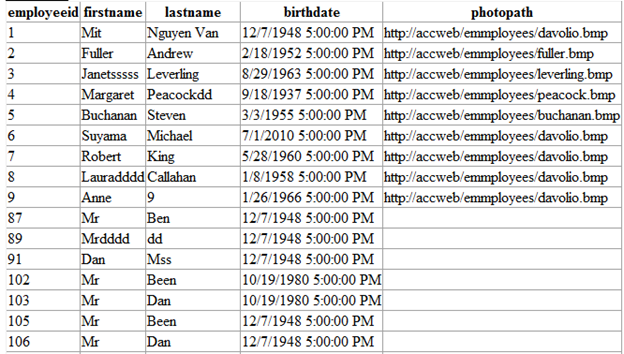
Như vậy là cơ bản chúng ta có thể chuyển đổi qua lại giữa JSON và một vài kiểu của .net.
Trong PHP


![clip_image002[4]](https://ngotuongdan.files.wordpress.com/2013/10/clip_image0024.jpg "clip_image002[4]")


