Showing posts with label Winform. Show all posts

Monday, April 20, 2015

SyndicationFeed - Đọc RSS với .Net 4.0 trở nên đơn giản

Sử dụng thư viện System.ServiceModel với 02 lớp

System.ServiceModel.Syndication.SyndicationFeed;
System.ServiceModel.Syndication.SyndicationItem;

Code ví dụ
[sourcecode language="csharp"]
List<SyndicationItem> rss = new List<SyndicationItem>();
string url = "http://vnexpress.net/rss/the-thao.rss";
XmlReader xmlreader = XmlReader.Create(url);
SyndicationFeed rssfeed = SyndicationFeed.Load(xmlreader);
xmlreader.Close();

foreach (SyndicationItem item in rssfeed.Items)
{
rss.Add(item);
}
[/sourcecode]

Demo ví dụ:
Untitled

Untitled1

Mã nguồn demo
[sourcecode language="csharp"]
using System;
using System.Collections.Generic;
using System.ComponentModel;
using System.Data;
using System.Diagnostics;
using System.Drawing;
using System.Linq;
using System.ServiceModel.Syndication;
using System.Text;
using System.Threading.Tasks;
using System.Windows.Forms;
using System.Xml;

namespace WindowsFormsApplication1
{
public partial class Form1 : Form
{
List<SyndicationItem> rss;
public Form1()
{
InitializeComponent();
this.listBox1.MouseDoubleClick += new System.Windows.Forms.MouseEventHandler(this.listBox1_MouseDoubleClick);
this.button1.Click += new System.EventHandler(this.button1_Click);
}

private void Form1_Load(object sender, EventArgs e)
{

}

private void load()
{
rss = new List<SyndicationItem>();
string url = textBox1.Text;
XmlReader xmlreader = XmlReader.Create(url);
SyndicationFeed rssfeed = SyndicationFeed.Load(xmlreader);
xmlreader.Close();

foreach (SyndicationItem item in rssfeed.Items)
{
rss.Add(item);
listBox1.Items.Add(item.Title.Text);
}
}

private void button1_Click(object sender, EventArgs e)
{
load();
}

private void listBox1_MouseDoubleClick(object sender, MouseEventArgs e)
{
if (listBox1.SelectedItem == null)
return;

if (e.Clicks == 2)
{
Process.Start(rss[listBox1.SelectedIndex].Links[0].Uri.ToString());
}
}

}
}
[/sourcecode]

Tuesday, April 14, 2015

JavaScriptSerializer: JSON serialize và deserialize trong C#

Ngày này JSON đang trở nên phổ biến bởi tính tiện lợi của nó so với XML. Với .Net thư viện JavaScriptSerializer đã được phát triển giúp cho việc chuyển đổi dữ liệu dang định dạng JSON trở nên rất đơn giản.

Chúng ta cùng tìm hiểu một chút về thư viện này qua ví dụ sau:
Mã nguồn
Định nghĩa lớp

[sourcecode language="csharp"]

public class Student
{
public Student()
{
}
public Student(int id, string name)
{
_id = id;
_name = name;
}

int _id;
string _name;
public int ID
{
get
{
return _id;
}

set
{
_id = value;
}
}

public string Name
{
get
{
return _name;
}

set
{
_name = value;
}
}
}
[/sourcecode]

Chuyển đối tượng sang json
[sourcecode language="csharp"]
Student s = new Student(100, "Nguyễn Văn Mít");
string str = serializer.Serialize(s);
Response.Write("Object: " + str);
[/sourcecode]

Kết quả chạy có như sau:
Object: {"ID":100,"Name":"Nguyễn Văn Mít"}

Chuyển từ chuỗi JSON sang đối tượng Student
[sourcecode language="csharp"]
Student s1 = serializer.Deserialize<Student>(str);
Response.Write("<br/>Name: " + s1.Name);
[/sourcecode]

Tương tự như vậy chúng ta cũng có thể chuyển một mảng sang JSON và ngược lại
Tạo một mảng như sau
[sourcecode language="csharp"]
List<Student> list = new List<Student>();
list.Add(new Student(1, "Trần Văn Cam"));
list.Add(new Student(2, "Trần Thanh Long"));
list.Add(new Student(3, "Lê Thị Lựu"));

string strlist = serializer.Serialize(list);
Response.Write("<br/>List: " + strlist);

// in
Response.Write("<br/>List deserialize ");
List<Student> listDe = serializer.Deserialize<List<Student>>(strlist);
foreach (Student item in listDe)
{
Response.Write("<br/>Name: " + item.Name);
}
[/sourcecode]

Chạy lại ví dụ, chúng ta có kết quả
List: [{"ID":1,"Name":"Trần Văn Cam"},{"ID":2,"Name":"Trần Thanh Long"},{"ID":3,"Name":"Lê Thị Lựu"}]

Chuyển một DataTable sang JSON và ngược lại
Kết nối và đọc dữ liệu
[sourcecode language="csharp"]
SqlConnection conn = new SqlConnection("server=.;database=northwind;uid=sa;pwd=sa;");
SqlDataAdapter adp = new SqlDataAdapter("Select employeeid, firstname, lastname, birthdate, photopath from employees", conn);
DataSet ds = new DataSet();
adp.Fill(ds, "Emp");
[/sourcecode]

Chuyển sang JSON
[sourcecode language="csharp"]
List<Dictionary<string, object>> table = new List<Dictionary<string, object>>();
foreach (DataRow r in ds.Tables[0].Rows)
{
Dictionary<string, object> column = new Dictionary<string, object>();
foreach (DataColumn c in ds.Tables[0].Columns)
{
column.Add(c.ColumnName, r[c.ColumnName]);
}
table.Add(column);
}

string dsStr = serializer.Serialize(table);
Response.Write("<br/>Data table: " + dsStr);
[/sourcecode]

Chuyển từ JSON sang DataTable
[sourcecode language="csharp"]
List<Dictionary<string, object>> t2 = serializer.Deserialize<List<Dictionary<string, object>>>(dsStr);
DataTable dt = ds.Tables[0];
dt.Clear();
DataRow deRow;
foreach (Dictionary<string, object> d in t2)
{
deRow = dt.NewRow();
foreach (DataColumn col in dt.Columns)
{
deRow[col.ColumnName] = (d[col.ColumnName] == null ? DBNull.Value : d[col.ColumnName]);
}
dt.Rows.Add(deRow);
}
GridView1.DataSource = dt;
GridView1.DataBind();
[/sourcecode]

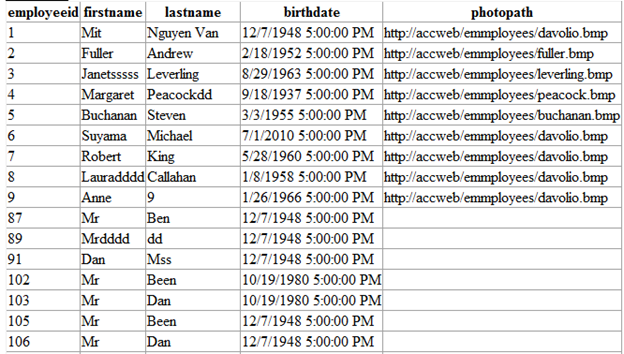
Tới đây chạy lại ví dụ có kết quả như sau:

Data table: [{"employeeid":1,"firstname":"Mit","lastname":"Nguyen Van","birthdate":"\/Date(-664786800000)\/","photopath":"http://accweb/emmployees/davolio.bmp"},{"employeeid":2,"firstname":"Fuller","lastname":"Andrew","birthdate":"\/Date(-563871600000)\/","photopath":"http://accweb/emmployees/fuller.bmp"},{"employeeid":3,"firstname":"Janetsssss","lastname":"Leverling","birthdate":"\/Date(-200127600000)\/","photopath":"http://accweb/emmployees/leverling.bmp"},{"employeeid":4,"firstname":"Margaret","lastname":"Peacockdd","birthdate":"\/Date(-1018854000000)\/","photopath":"http://accweb/emmployees/peacock.bmp"},{"employeeid":5,"firstname":"Buchanan","lastname":"Steven","birthdate":"\/Date(-468054000000)\/","photopath":"http://accweb/emmployees/buchanan.bmp"},{"employeeid":6,"firstname":"Suyama","lastname":"Michael","birthdate":"\/Date(1278003600000)\/","photopath":"http://accweb/emmployees/davolio.bmp"},{"employeeid":7,"firstname":"Robert","lastname":"King","birthdate":"\/Date(-302770800000)\/","photopath":"http://accweb/emmployees/davolio.bmp"},{"employeeid":8,"firstname":"Lauradddd","lastname":"Callahan","birthdate":"\/Date(-378025200000)\/","photopath":"http://accweb/emmployees/davolio.bmp"},{"employeeid":9,"firstname":"Anne","lastname":"9","birthdate":"\/Date(-124009200000)\/","photopath":"http://accweb/emmployees/davolio.bmp"},{"employeeid":87,"firstname":"Mr","lastname":"Ben","birthdate":"\/Date(-664786800000)\/","photopath":null},{"employeeid":89,"firstname":"Mrdddd","lastname":"dd","birthdate":"\/Date(-664786800000)\/","photopath":null},{"employeeid":91,"firstname":"Dan","lastname":"Mss","birthdate":"\/Date(-664786800000)\/","photopath":null},{"employeeid":102,"firstname":"Mr","lastname":"Been","birthdate":"\/Date(340822800000)\/","photopath":null},{"employeeid":103,"firstname":"Mr","lastname":"Dan","birthdate":"\/Date(340822800000)\/","photopath":null},{"employeeid":105,"firstname":"Mr","lastname":"Been","birthdate":"\/Date(-664786800000)\/","photopath":null},{"employeeid":106,"firstname":"Mr","lastname":"Dan","birthdate":"\/Date(-664786800000)\/","photopath":null}]


table

Như vậy là cơ bản chúng ta có thể chuyển đổi qua lại giữa JSON và một vài kiểu của .net.


Trong PHP

Wednesday, November 12, 2014

Winform C# 1 – Questions

Câu 1 _____is any action directed at the application.

[A] Event

[B] Method

[C] Class

[D] Object

Câu 2____property is used to get or set the object that contains data about the control.

[A] Value

[B] Tag

[C] Text

[D] Name

Câu 3 Which of the following statement with respect to Data Grid control are True? (Choose all correct answers)

[A] By default, the DataGrid display 1 page at a time.

[B] When the DataGrid control is set to a valid data source, the control is populated automatically

[C] Each field in the DataGrid is bound to a single column based on the DataSource

[D] The DataGrid control display data in tabular format and optionally supports data editing.

Câu 4 When an MDI parent form is closed, the Closing event of all MDI child forms are raised before the MDI parent form’s Closing event is raised

[A] False

[B] True

Câu 5 What of the followings is correct for creating a command object with the connection con?

[A] SqlCommand Cmd = con.SetSqlCommand(“Select * From Student”);

[B] SqlCommand Cmd = con.GetSqlCommand(“Select * From Student”);

[C] SqlCommand Cmd = new SqlCommand(con,”Select * From Student”);

[D] SqlCommand Cmd = new SqlCommand(“Select * From Student”, con);

Câu 6 The method can be used to draw a rectangle or a square depending on the coordinates passed as its argument.

[A] FillSquare

[B] FillRectangle

[C] DrawSquare

[D] DrawRetangle

Câu 7 General Project Properties are applicable to all project configurations and are set in the properties window.

[A] False

[B] True

Câu 8 Name the object which notifes other objects about an event

[A] Consumer

[B] Publisher

[C] Subscriber

[D] Tester

Câu 9 _____it the normal ouput type for a WinForm project

[A] Windows Application

[B] Console Application

[C] Class Library

[D] Windows Forms

Câu 10 We can generate Typed Dataset from a Datadapter

[A] False

[B] True

Câu 11 To preserve screen space on the monitor, VS.NET provides us with (Choose all answers) Note

[A] Class View Window

[B] Command Window

[C] Solution Explorer Window

[D] Auto-Hide Window

[E] Properties Window

[F] Tabbed Windows

Câu 12Images can be drawn using the _____method to of the Graphics class.

[A] PaintImage()

[B] DrawImage()

[C] CreateImage()

[D] FromImage()

Câu 13 DataSet store its data in XML

[A] False

[B] True

Câu 14 The ____control groups a set of controls within a non-labeled an scrollable frame

[A] PictureBox

[B] Tab

[C] Frame

[D] Panel

Câu 15 The ____feature of Windows Installer provider a standard method for distributing components and ensures that the installed component is of the correct version.

[A] VersionUpdate

[B] CAB

[C] Msi

[D] Merge Modules

Câu 16 To create an instance of the Font class using existing Font and FontStyle, the constructor is:

[A] public void Font(string fontname, float size);

[B] public Font(FontStyle fs, Font f);

[C] public void Font(Font f, FontStyle fs);

[D] public Font(Font f, FontStyle fs);

[E] public Font(string fontname, float size);

Câu 17 Which control is used to display a short, customized help message for individual controls on a form?

[A] ToolTip

[B] HelpText

[C] HelpTool

[D] ToolClass

Câu 18 For using SQL.NET Data Provider what using statement of the following is correct?

[A] using System.Data;

[B] using System.Data.SqlServer;

[C] using System.Data.OleDb;

[D] using System.Data.SqlClient;

Câu 19 OLE is the abbreviation for ____

[A] Object Like Environment

[B] Object Linking and Embedding

[C] Object Linking Environment

[D] Object Linking and Empower

Câu 20 Microsoft Windows Installer is shipped along with Windows 2000, Windows ME and Windows XP as an installation and configuration service.

[A] False

[B] True

Câu 21 Which namespace is VS.NET contains classes that help in constructing and sending emails?

[A] System.Web.Mail

[B] System.Mail

[C] System.Web.MailMessage

[D] System.Web.MailMessages

Câu 22 Statement 1: Tree View displays items like folders, drives etc.

Statement 2: List View display items like current folder contents.

[A] Only statement 2 is true

[B] Both the statements are true

[C] Only statement 1 is true

[D] Both the statements are false

Câu 23 The DataAdapter method is used to fetch the values from the data source to the DataSet and also to update the data source with the DataSet data.

[A] False

[B] True

Câu 24 To perform a change to a table using the Command object named Cmd, what statement of the following correct?

[A] Cmd.ExecuteReader()

[B] Cmd.ExecuteScalar()

[C] Cmd.ExecuteQuery()

[D] Cmd.ExecuteNonQuery()

[E] Cmd.ExecuteUpdate()

Câu 25 When a Data Form is created using the Data Form Wizard, which of the following classes are used by default?(Choose all correct answers)

[A] OleDbDataWriter

[B] OleDbDataAdapter

[C] OleDbStatement

[D] OleDbDataReader

[E] OleDbConnection

[F] OleDbCommand

Câu 26 ____property of a connection object is used to get or set the string used to open a database

[A] ConnectionParams

[B] ConnectionInfo

[C] StringConnection

[D] ConnectionString

Câu 27 property is used to get or set the data source that the grid is displaying data for.

[A] DataSrc

[B] DataSource

[C] DataSet

[D] DataMember

[E] DataSender

Câu 28 _____property is used to get or set the edges of the control are anchored to the edges of its container.

[A] Hang

[B] Fixed

[C] Anchor

[D] Dock

Câu 29 MessageBox is a type of dialog box

[A] False

[B] True

Câu 30 OLE is the abbreviation for Object Linking and Embedding

[A] False

[B] True

Câu 31 ____property is used to get or set the shortcut menu associated with the control.

[A] PopUpMenu

[B] SubMenu

[C] ContextMenu

[D] MainMenu

Câu 32 The DataReader component is used to get the read-only and forward-only data from the data source.

[A] False

[B] True

Câu 33 System.Windows.Forms is an important____of the class libraries in .NET framework?

[A] Namespace

[B] Class

Câu 34 To get values of the columns of the i-th row in a DataTable object named datatable, what of the follwings is correct?

[A] DataColumn array = datatable.Rows[i].ItemArray;

[B] String[]array = datatable.Rows[i].ItemArray;

[C] Object[]array = datatable.Rows[i].ItemArray;

[D] DataRow array = datatable.Rows[i].ItemArray;

Câu 35 What mode is VS.NET allow you to step through each line of code and trace the execution of your application?

[A] Neither Debug Mode nor Release Mode

[B] Both Debug Mode and Release Mode

[C] Release Mode

[D] Debug Mode

Câu 36 Link Lable is commands control?

[A] False

[B] True

[C] There is no link label control

Câu 37 Brushes can be created using one of the following classe(Choose all correct answers)

[A] ThinBrush

[B] ThickBrush

[C] PlainBrush

[D] TextureBrush

[E] SolidBrush

[F] LinearGradientBrush

[G] GradientBrush

Câu 38 What mode is VS.NET allow you create a portable exe(EXE) file?

[A] Neither Debug Mode nor Release Mode

[B] Debug Mode

[C] Both Debug Mode and Release Mode

[D] Release Mode

Câu 39 What statement in the followings is correct

I. The instance properties and methods are those, which are common to all the instances of the class.

II. The shared properties and methods are those, which are specific to a particular instance.

[A] Both of I and II statements are correct

[B] Both of I and II statements are incorrect

[C] Only II statement is correct

[D] Only I statement is correct

Câu 40 ADO.NET provides features for accessing traditional databases like SQL Server as well as databases, which are accessed using ____.(choose all correct answers)

[A] ODBC

[B] VB.NET

[C] OLEDB

[D] XML

[E] DataSets

Câu 41 Name the .NET data providers which are available is VS.NET?(Choose all correct answers)

[A] ODBC.NET Framework Data Provider

[B] SQL.NET Framework Data Provider

[C] OLEDB.NET Framework Data Provider

[D] Oracle.NET Framework Data Provider

[E] Access.NET Framework Data Provider

Câu 42 You can create your own table in DataSet

[A] False

[B] True

Câu 43 The____ event of the PrintDocument class is triggered immediately before each PrintPage event ocurs.

[A] StartPrint

[B] BeginPrint

[C] PrintPage

[D] QueryPageSettings

Câu 44 ___is the easiest way to allow the user to interact with the application.

[A] Label control

[B] Text control

[C] Button control

[D] Form

Câu 45 The term packaging imlies bundling up all the files in the application into a single file called a Distribution Unit

[A] False

[B] True

Câu 46 Which namespace does the class ListView belong to?

[A] System.Windows.Lists

[B] System.Windows.Drawing

[C] System.Windows.Paint

[D] System.Windows.Forms

Câu 47 The____property of a DataGrid control, allow filling various kinds of data in a DataGrid including data from a DataSet, DataViewManager, Arrays, Lists etc.

[A] DataRecords

[B] FillSchema

[C] Fill

[D] FillData

[E] DataSource

Câu 48 The Pen class belongs to the ____namespace and cannot be inherited

[A] System.Painting

[B] System.GraphicsObjects

[C] System.Graphics

[D] System.Drawing

Câu 49 ____are the visual effects supported in WinForms (Choose all correct answers).

[A] Collections

[B] Class Libraries

[C] Opaque Forms

[D] Visual Inheritance

[E] Control Anchoring

[F] Cotrol Docking

[G] Transparent Forms

Câu 50 Help is one of the most important but then also mostly forgotten part of any application

[A] False

[B] True

Câu 51 Which class represents shortcut menus that can be displayed when the user clicks the right mouse button over a control or area of the form?

[A] ToolMenu

[B] MainMenu

[C] ContextMenu

[D] FileMenu

Câu 52 The value of the HelpButton property is ignored if the maximize of minimize boxes are shown.

[A] False

[B] True

Câu 53 List the key elements of COM (choose all correct answers)

[A] A set of theorems which must be proven for checking the correctness of the object model

[B] A set of graphical symbol for modeling the objects

[C] A set of services for creating and exposing the classes

[D] A set of specifications defining the programming protocol

Câu 54 ____ are the Print support controls provided by WinForms.(Choose all correct answers)

[A] PrintPreview

[B] PrintFile

[C] PrintPreviewControl

[D] PrintDirectory

[E] PrintDocument

Câu 55 What of the followings are data validation mode in WinForms?(Choose all correct answers)

[A] Form-Level Validation

[B] There is no Data validation mode in Winforms

[C] Control-Level Validation

[D] Field-Level Validation

Câu 56 What of the folllowings is correct if we want to set the Achild form as a child form of the parent form named TheParent?

[A] AChild.MdiParent = TheParent;

[B] AChild.TheParent = true;

[C] Achild.MdiChild = AChild;

[D] TheParent.MdiChild = AChild;

[E] TheParent.AChild = true;

Câu 57 Class Library is one of the main components of the .NET framework and is divided in to ____

[A] Namespaces

[B] DLL components

[C] GUI components

Câu 58 To bind data to controls as ListBox, ComboBox, DataGrid, what type of data bindings shoud you use?

[A] Hybrid Data Binding

[B] Complex Data Binding

[C] Simple Data Binding

[D] Structured Data Binding

Câu 59 The ____control groups a set of controls within a non-labeled and scrollable frame

[A] PictureBox

[B] CheckedBox

[C] Panel

[D] Frame

Câu 60 ____property is used to get or set a value that is returned to the parent form when the button is clicked.

[A] ButonResult

[B] DialogResult

[C] ButtonValue

[D] ResultValue

[E] ResultDialog

Câu 61 Arrange the sequence in which the key events are triggered

[A] KeyPress, KeyUp, KeyDown

[B] KeyUp, KeyPress, KeyDown

[C] KeyDown, keyPress, KeyUp

[D] KeyPress, keyDown, KeyUp

[E] KeyUp, KeyDown, KeyPress

[F] KeyDown, KeyUp, KeyPress

Câu 62 The types of list box supported in Winforms are(Choose all correct answers)

[A] ListBox

[B] CheckedListBox

[C] ComboBox

[D] DropDownbox

Câu 63 What are thee steps involved involved in calling one from another form?(choose all answers)

[A] Create an instance of the calling form

[B] Create an instance of the form to be called

[C] Invoke Show

Câu 64 Which Control is used to display the current status of the application using framed windows?

[A] TreeView

[B] StatusBar

[C] ToolBar

[D] ListView

Câu 65 Which of the following objects can we use to read data from a Micorosoft SQL Server 2000 database? (choose all correct answers)

[A] SQLDataAdapter

[B] DataSet

[C] OleDbDataAdapter

[D] ADORecordSet

[E] XmlTextReader

Câu 66 Use DataReader when we want to have data scrollable

[A] False

[B] True

Câu 67 What is component is used to fetch the values from the data source to DataSet and also update the data source with data in the DataSet?

[A] DataWriter

[B] DataReader

[C] DataAdapter

[D] DataCommand

Câu 68 The ____property of the Form control is used to determine whether there are any MDI child forms open in your MDI application.

[A] ActiveMdiChildren

[B] ActiveMdiChild

[C] IsMdiChild

[D] IsMdiChildren

Câu 69 ____are the collection of reusable classes or types

[A] Namespaces

[B] Collections

[C] Class libraries

Câu 70 ____control combines the features of the TextBox and the ListBox controls

[A] ToolBar

[B] StatusBar

[C] Label

[D] ComboBox

Câu 71 A custom control should you use to verify an authorized aplication user called as _____

[A] Composite Custom Control

[B] Standard Control

[C] Single Control

[D] Complex Control

Câu 72 Each Merge Module holds distinctive version details that are used by Windows Installer

[A] False

[B] True

Câu 73 Which of the following statements with respect to ADO.Net are True? (Choose all correct answers)

[A] System built on ADO.NET are intrinsically highly scaleable

[B] ADO.NET objects are all strongly typed.

[C] When we use the DataSet object, ADO.NET is based on disconnected data access.

[D] in ADO.NET, the RecordSet is bound to the data source

Câu 74 The method ____of the Control class conceals the control from the user.

[A] Close

[B] visible

[C] Dispose

[D] Hide

Câu 75 What control support us to display the list items in different types as text only, text with small icons, text with large icons and report views?

[A] ListView

[B] ListBox

[C] CheckedListBox

[D] ComboBox

Câu 76 IntelliSence pops up a list of _____that can be called on an object (Choose all correct answers). Xem lai

[A] Hints

[B] Values

[C] Properties

[D] Links

[E] Tags

Câu 77 The____ control is used to display text when the mouse points to a particular control

[A] Toolbar

[B] StatusBar

[C] Menu

[D] ToolTip

Câu 78 What are the types of Dialog boxes?(choose all correct answers)

[A] Custom dialog boxes

[B] Common dialog boxes

[C] Modeless dialog boxes

[D] Modal dialog boxes

Câu 79 which class is the base class for all the controls that can be used in Windows Forms?

[A] Control

[B] Controls

[C] Forms

[D] Objects

Câu 80 GDI + resides in _____ assembly.

[A] System.Painting

[B] System

[C] System.Graphics

[D] System.Drawing

Câu 81 The ____ property of the LinkLabel control is used to specity the text, which has to be displayed as a link.

[A] HyperLink

[B] URLName

[C] LinkName

[D] LinkArea

Câu 82 What of the following are correct for creating a connection object to database named MyDB? (Choose all correct answers)

[A] SqlConnection con = new SqlConnection(“server=myserver;

Integrated Security = SSPI; database=MyDB”);

[B] SqlConnection con = new SqlConnection(“server=myserver”

Intergrated Security=SSPI; Data Source=MyDB);

[C] SqlConnection con = new SqlConnection(“Data Source=myserver;

Integrated Sercurity=SSPI; Initial Catalog=MyDB”);

C©u 83 List the advantages of DCOM (Choose all correct answers)

[A] Provides Location Transparency(Distributed Architecture)

[B] Platform independent

[C] Fully Language Independent

[D] Supports version compatibility

C©u 84 The view types supported in Winforms are (choose all correct answers)

[A] Text with large icons

[B] Text only

[C] Text with small icons

[D] Report view

C©u 85 If maximize and minimize buttons are displayed then the HelpButton property is ignored.

[A] False

[B] True

C©u 86 The ____ event of the Form control is used to perform tasks such as allocating resources used by the form

[A] Allocate

[B] Activate

[C] Load

[D] Activated

C©u 87 To get values of the colums of the i-th row in a DataTable object named datatable, what of the followings is correct?

[A] Object [] array = datatable.Rows[i].ItemArray;

[B] DataColumn array = datatable. Rows[i].ItemArray;

[C] String[] array = datatable. Rows[i].ItemArray;

[D] DataRow array = datatable. Rows[i].ItemArray;

Thursday, October 31, 2013

Đổi không khí học winform C# - Sử dụng timer control viết game click to win

Bắt đâu: Giao diện game

Game

Click các số 0 cho đến khi chúng mất hêt

win

Vậy là thắng rồi :D (chỉ để đổi không khí học một tí nhe các bạn)

Source nguồn đây.

Friday, March 1, 2013

Nội dung thực hành WFC# II - 02 lớp cao đẳng

Các bạn tham khảo nhé.

Link download CD lý thuyết Sử dụng phần mềm DAEMON Tools Lite để đọc nhe

Buổi 01: Transaction đơn giản và sử dụng transaction để đảm bảo dữ liệu câp nhật vao 03 bảng
Download here

[youtube=http://youtu.be/NhByTMv3cnc]

Buổi 02: Mail and netwwork
Link download ở đây

Email - screen capture with custom dialog
Download

[youtube=http://youtu.be/0K0FR5BkvMU]
Next demo

[youtube=http://youtu.be/l3kjBR-pHAY&w=380&h=200]

Buổi 03: Remoting
Link download ở đây

Buổi 04:ManipulatingData and AdvancedDataAccess

ManipulatingData

AdvancedDataAccess

Tham khảo sử dụng luồng cập nhật các control trên form ở đây

Buổi 05:

Download tài liệu tham khảo ve demo

[youtube=http://youtu.be/WHJYlxEQtAc&w=380&h=200]


Một số câu hỏi ôn lý thuyết các bạn nên tìm hiểu thêm
Adv .et & Security in .Net complete
-----------------------------------------------------------
Hi vọng có ích cho các bạn

Các bài hướng dẫn bằng video tôi sẽ tranh thủ đưa lên youtube.com để các bạn tiện theo dõi.

Wednesday, January 30, 2013

Sunday, December 16, 2012

Video hướng dẫn từng bước xây dựng ứng dựng với C# SqlServer

Do một số bạn không có điều kiện đến lớp tôi sẽ post một loạt video hướng dẫn xây dựng một ứng dụng quản lý đơn giản nhằm giúp các bạn ôn tập tốt hơn môn học Window form with C# chương trình ACCP.

Nội dung môn học WFC#

  1. Thiết kế giao diện từ Session 01 ->06

  2. Thao tác với CSDL Session 07-10

  3. Nhóm bài hỗ trợ


Xây dựng phần mềm quản lý hồ sơ sinh viên

-         SinhVien(masv, hoten, ngay,gioitinh)

-         DiemDanh(masv,ngayhoc,vang)

Yêu cầu chức năng

-         Viết CT tạo sinh viên mới

-         Tìm sinh viên theo mã số

-         Hiển thị ds sinh viên (edit,delete)

-         Điểm danh theo sinh viên tham gia lớp học theo từng ngày

-         Báo cáo:

  • In ra ds sinh viên

  • Thống kê tỉ lệ tham gia lớp học của sinh viên

  • Đóng gói, triển khai và cập nhật phần mềm thông qua hệ thống mạng


Tôi sẽ sớm upload để các bạn tham khảo.

Tổng quan và giao diện

http://www.youtube.com/watch?v=OYV9xsZSFgA

Giao diện

http://www.youtube.com/watch?v=0upGEc3Ij1k

Kết nối dữ liệu

http://www.youtube.com/watch?v=kG3qahrmhOU
Đọc dữ liệu

http://www.youtube.com/watch?v=YMZ5gYc9g3o

Thao tác dữ liệu

http://www.youtube.com/watch?v=S778YynB308
Báo cáo

http://www.youtube.com/watch?v=WSYD-XUr1a8

Đóng gói

http://www.youtube.com/watch?v=XgNE9zkCjog

Custom control

http://www.youtube.com/watch?v=6isPeiXcFx4

Login

http://www.youtube.com/watch?v=p4T5UmUvGD8

Các bạn tham khảo nguồn tại đây.

Sunday, October 7, 2012

Lập trình phân tán với .Net - (.Net remoting)

DOT NET REMOTING

  1. Create Remote Object

  2. Create Server

  3. Create Client


  • Create Class Library  project

  • Create a class MyProxy


[sourcecode language="csharp" wrapline="false"]
using System;
using System.Collections.Generic;
using System.Linq;
using System.Text;
using System.Collections;
using System.Diagnostics;
using System.Security.Permissions;
using System.Data;
using System.Data.SqlClient;

namespace ProxyObject
{
public class MyProxy: MarshalByRefObject
{
ArrayList Re_list = new ArrayList();
/// <summary>
/// Ham khoi tao
/// </summary>
public MyProxy(){}

public bool MakeRequest(string UserName)
{
this.Re_list.Add(UserName + " - " + DateTime.Now.ToString("dd-MM-yyyy HH:mm:ss"));
return true;
}

public string GetInfor()
{
string re = "Hello: ";
for (int i = 0; i < this.Re_list.Count; i++)
{
re += "\n"+this.Re_list[i];
}

return re;
}

public DataSet GetEmployees()
{
DataSet ds = new DataSet();

SqlConnection conn = new SqlConnection("Server=.\\SqlExpress;database=Northwind;Integrated Security=SSPI;");
conn.Open();
SqlDataAdapter adp = new SqlDataAdapter("Select * from Employees", conn);
adp.Fill(ds, "Employee");

return ds;
}

[PrincipalPermissionAttribute(SecurityAction.Demand, Role = "Administrators")]
public string Shutdown()
{
Process.Start("shutdown", "/l");
return "OK";
}
}
}
[/sourcecode]

  • Combine project

  • Create new Window Application Project

  • Add References library  project

  • Add new form and design as


[sourcecode language="csharp" wrapline="false"]
using System;
using System.Collections.Generic;
using System.ComponentModel;
using System.Data;
using System.Drawing;
using System.Linq;
using System.Text;
using System.Windows.Forms;
using System.Runtime.Remoting;
using System.Runtime.Remoting.Channels;
using ProxyObject;
using System.Runtime.Remoting.Channels.Http;

namespace Server
{
public partial class FrmServer : Form
{
HttpChannel httpChanel;
public FrmServer()
{
InitializeComponent();
AppDomain.CurrentDomain.SetPrincipalPolicy(System.Security.Principal.PrincipalPolicy.WindowsPrincipal);
}

private void btnStart_Click(object sender, EventArgs e)
{
StartServer();
}

private void StopServer()
{
if (ChannelServices.GetChannel("http") != null)
ChannelServices.UnregisterChannel(httpChanel);
lstLog.Items.Add("Server stopped !");
}

private void StartServer()
{
StopServer();
int port = Convert.ToInt32(txtPort.Text);
WellKnownObjectMode mode = chkCall.Checked ? WellKnownObjectMode.SingleCall : WellKnownObjectMode.Singleton;
httpChanel = new HttpChannel(port);
ChannelServices.RegisterChannel(httpChanel, false);

RemotingConfiguration.RegisterWellKnownServiceType(typeof(MyProxy), "MyServices", mode);

lstLog.Items.Add("Server started !");
}

private void btnStop_Click(object sender, EventArgs e)
{
StopServer();
}

private void button1_Click(object sender, EventArgs e)
{
ProxyObject.MyProxy obj = new MyProxy();
obj.Shutdown();
}
}
}
[/sourcecode]

  • Create new Window Application Project

  • Add References library  project

  • Add new form and design as


[sourcecode language="csharp"]
using System;
using System.Collections.Generic;
using System.ComponentModel;
using System.Data;
using System.Drawing;
using System.Linq;
using System.Text;
using System.Windows.Forms;
using System.Runtime.Remoting;
using ProxyObject;
using System.Security.Principal;

namespace Client
{
public partial class Form1 : Form
{
MyProxy obj;
public Form1()
{
InitializeComponent();

AppDomain.CurrentDomain.SetPrincipalPolicy(System.Security.Principal.PrincipalPolicy.WindowsPrincipal);
}

private void btnConnect_Click(object sender, EventArgs e)
{
string url = "http://" + txtServer.Text + ":" + txtPort.Text + "/MyServices";
RemotingConfiguration.RegisterWellKnownClientType(typeof(MyProxy), url);
btnGet.Enabled = true;
button1.Enabled = true;
obj = new MyProxy();
btnConnect.Enabled = false;
}

private void btnGet_Click(object sender, EventArgs e)
{
obj.MakeRequest(textBox1.Text);
rTContent.Text = obj.GetInfor();
}

private void button1_Click(object sender, EventArgs e)
{
try
{
obj = new MyProxy();
dataGridView1.DataSource = obj.GetEmployees().Tables[0];
}
catch (Exception ex)
{
MessageBox.Show(ex.ToString());
}
}
}
}
[/sourcecode]


Test application


Chúc bạn thành công.

Friday, July 6, 2012

Demo bulkcopy với ADO.NET

Trong phần này tôi demo khả năng sao chép nhanh dữ liệu hàng loạt với ADO.NET


[sourcecode language="CSharp" wraplines="false"]
using System;
using System.Collections.Generic;
using System.ComponentModel;
using System.Data;
using System.Drawing;
using System.Linq;
using System.Text;
using System.Windows.Forms;
using System.Data.SqlClient;
using System.Security.Principal;

namespace BulkCopy
{
public partial class Copy : Form
{
SqlConnection conn;
SqlConnection DesConn;
SqlBulkCopy bulk;
public Copy()
{
InitializeComponent();
conn = new SqlConnection("Server=.;database=Northwind;uid=sa;pwd=sa;");
DesConn = new SqlConnection("Server=.;database=Northwind;uid=sa;pwd=sa;");

conn.Open();
DesConn.Open();

bulk = new SqlBulkCopy(DesConn);
}

private void button1_Click(object sender, EventArgs e)
{
listBox1.Items.Insert(0, "BulkCopy started " + DateTime.Now.ToString("HH - MM - ss"));
// Perform an initial count on the destination table.
SqlCommand command = new SqlCommand("SELECT * FROM Items", conn);

SqlDataReader reader = command.ExecuteReader();

bulk.DestinationTableName = "NewItems";
bulk.WriteToServer(reader);

reader.Close();

listBox1.Items.Insert(0, "BulkCopy end " + DateTime.Now.ToString("HH - MM - ss"));
}

private void button2_Click(object sender, EventArgs e)
{
SqlCommand comm = new SqlCommand("Delete NewItems", DesConn);
comm.ExecuteNonQuery();
}

private void button3_Click(object sender, EventArgs e)
{
listBox1.Items.Insert(0, "Copy started " + DateTime.Now.ToString("HH - MM - ss"));

// Perform an initial count on the destination table.
SqlCommand command = new SqlCommand("SELECT * FROM Items", conn);

SqlDataReader reader = command.ExecuteReader();

SqlCommand comm = new SqlCommand("", DesConn);
while (reader.Read())
{
comm.CommandText = "Insert into NewItems values(" + reader.GetValue(0).ToString() + ",'" + reader.GetValue(1).ToString() + "')";
comm.ExecuteNonQuery();
}

reader.Close();

listBox1.Items.Insert(0, "Copy end " + DateTime.Now.ToString("HH - MM - ss"));
}

private void Copy_Load(object sender, EventArgs e)
{
WindowsIdentity user = System.Security.Principal.WindowsIdentity.GetCurrent();

this.Text = user.Name;

toolStripStatusLabel1.Text = user.Name;
}
}
}
[/sourcecode]

Transaction with ADO.NET - Quản lý phiên làm việc với ADO.NET

Transaction là một trong những thuật ngữ rất phổ biến đố với lập trình viên. Với SQLServer hay bấc kỳ một hệ quản trị csdl nào đều phải đảm bảo tính ACID, trong trường hợp thực thi hàng loạt các thao tác thay đổi đến csdl thì sẽ có những tình huống cần ràng buộc hoạt là tất cả hoàn thành hoạt là không tác vụ nào hoàn thành. Trong nội dung của bài này tôi giới thiệu với các bạn các thức cài đặc Transacton trên nền ADO.NET.

[caption id="attachment_668" align="aligncenter" width="300"]Transaction with ADO.NET Transaction with ADO.NET[/caption]

Tham khảo sources nguồn tại đây:

[sourcecode language="CSharp" wraplines="false"]
using System;
using System.Collections.Generic;
using System.ComponentModel;
using System.Data;
using System.Drawing;
using System.Linq;
using System.Text;
using System.Windows.Forms;
using System.Data.SqlClient;

namespace Transaction
{
public partial class Form1 : Form
{
SqlConnection conn;
public Form1()
{
InitializeComponent();

conn = new SqlConnection("Server=.;database=Northwind;uid=sa;pwd=sa;");
}

private void button1_Click(object sender, EventArgs e)
{
if (conn.State == ConnectionState.Closed)
conn.Open();

listBox1.Items.Insert(0, "Connected");
}

private void button2_Click(object sender, EventArgs e)
{
listBox1.Items.Insert(0, "Transaction started");
SqlTransaction tran = conn.BeginTransaction("AddItems");

SqlCommand comm = new SqlCommand("", conn);
try
{
comm.Transaction = tran;

string strSql = "";

for (int i = 0; i < 10000; i++)
{
strSql += "Insert into Items values(" + i + ",'Name" + i + "')";
}

comm.CommandText = strSql;

int count = comm.ExecuteNonQuery();

if (count < 10000)
{
comm.Transaction.Rollback("AddItems");
listBox1.Items.Insert(0, "Transaction rollback");
}
else
{
comm.Transaction.Commit();
listBox1.Items.Insert(0, "Transaction commit");
}
}
catch
{
comm.Transaction.Rollback("AddItems");
listBox1.Items.Insert(0, "Exception raise -> Transaction rollback");
}
}

private void button3_Click(object sender, EventArgs e)
{
SqlCommand comm = new SqlCommand("Delete items", conn);
comm.ExecuteNonQuery();
}
}
}
[/sourcecode]

Friday, May 18, 2012

Custom Dialog trong winform

- Trong quá trình phát triển phần mềm thì việc phải hiệu chỉnh các công cụ và thư viện mặc định của hệ thống là một việc thường xuyên. Đối với window form cũng vậy. Bạn hãy thử nghỉ tất cả các chức năng của phần mềm mà bạn đang viết đều được việt hóa chỉ riêng hộp thống báo (MessageBox) thì giao diện nút nhấn là "Yes" và "No" như vậy sẽ làm cho phần mềm của bạn mất giá trị. Một vấn đề lớn nữa là nếu như khi triển khai phần mềm cho khách hàng qua thời gian sử dụng họ thông báo với bạn là phần mềm của bạn đang gặp lỗi và không thể chạy được như vậy bạn sẽ phản ứng thế nào ? Đến khách hàng hiệu chỉnh ? hay gọi điện thoại nhờ họ giải thích ? remote máy khách hàng ? các cách này coi ra hơi phiền phức. Nếu như bạn thống báo cho khách hàng của bạn là phần mềm của bạn hiện đang có lỗi và thêm một chức năng nhỏ trên đó cho phép phần mềm của bạn tự gởi thông báo lỗi chi tiết (exception phát sinh) về cho bạn thì sẽ giúp cho phần bạn được thông minh và có gí trị hơn.


[sourcecode language="CSharp" wraplines="false"]
using System;
using System.Collections.Generic;
using System.ComponentModel;
using System.Data;
using System.Drawing;
using System.Text;
using System.Windows.Forms;

namespace CustDialog
{
public partial class Form1 : Form
{
public Form1()
{
InitializeComponent();
}

private void btnShow_Click(object sender, EventArgs e)
{
try
{
int c = Convert.ToInt32(textBox1.Text) / Convert.ToInt32(textBox2.Text);
}
catch (Exception exa)
{
frmMessage frm = new frmMessage("Hệ thống có lỗi phát sinh, liên hệ monkey@abc.com để được giúp đỡ !", "Xác nhận", exa);
DialogResult result = frm.ShowDialog();
}
}
}
}
[/sourcecode]

[sourcecode language="CSharp" wraplines="false"]
using System;
using System.Collections.Generic;
using System.ComponentModel;
using System.Data;
using System.Drawing;
using System.Text;
using System.Windows.Forms;
using System.Net;
using System.Net.Mail;

namespace CustDialog
{
public partial class frmMessage : Form
{
string caption = "";
DialogResult ok = DialogResult.No;

public frmMessage(string Message, string Caption, Exception ex)
{
InitializeComponent();

label1.Text = Message;
caption = Caption;

this.Height = this.Height - 100;
this.richTextBox1.Visible = false;
this.richTextBox1.Text = ex == null ? "" : ex.ToString();
btnSend.Visible = (ex != null);
}

private void btnExp_Click(object sender, EventArgs e)
{
if (!this.richTextBox1.Visible)
{
this.richTextBox1.Visible = true;
this.Height = this.Height + 100;
this.btnExp.Text = "Thu nhỏ";
}
else
{
this.Height = this.Height - 100;
this.richTextBox1.Visible = false;
this.btnExp.Text = "Chi tiết";
}
}

private void btnSend_Click(object sender, EventArgs e)
{
this.Enabled = false;
string Sendto = "ngotuongdan01@gmail.com"; //Email Address to reciever
// tai khoan này các bạn sử đừng sử dụng để gửi tùm lum dùm tui nhe
string UserName = "ngotuongdan04@gmail.com"; //Ur Gmail address
string PassWord = "ngotuongdan"; //Gmail password
// this mail is my demo mail please not change it's password, tks alot
NetworkCredential loginInfo = new NetworkCredential(UserName, PassWord);
MailMessage msg = new MailMessage();
msg.From = new MailAddress(UserName);
msg.To.Add(new MailAddress(Sendto.ToString()));
msg.Subject = "Error"+ DateTime.Now.ToString();
msg.Body = richTextBox1.Text;
msg.IsBodyHtml = true;
SmtpClient client = new SmtpClient("smtp.gmail.com");
client.Port = 587;
client.EnableSsl = true;
client.UseDefaultCredentials = false;
client.Credentials = loginInfo;
client.Send(msg);
this.Enabled = true; ;
}

private void frmMessage_FormClosing(object sender, FormClosingEventArgs e)
{
e.Cancel = (ok == DialogResult.No);
}

private void button1_Click(object sender, EventArgs e)
{
ok = MessageBox.Show("Are you sure to change student information?", "Change information", MessageBoxButtons.YesNo, MessageBoxIcon.Question);
}
}
}
[/sourcecode]

Saturday, August 27, 2011

Theo doi thu muc - Folder monitor - C#

FileSystemWatcher là thư việc được xây dựng sẳn của .Net Framework cho phép chúng ta theo dõi một thư mục nào đó trên máy tính. Trong demo này tôi sử dụng để theo dõi ổ đĩa C: và cảnh báo thông qua file nhật ký và notifiIcon dưới góc phải màn hình.


Sau khi chạy bạn có thể nhấn chuột phải lên Icon và chọn Show để xem file nhật ký


Giao diện đơn giản bạn có thể hiệu chỉnh lại tùy ý


Thêm một hình nữa


Download source code ở đây DemoFolderMonitoring

Thursday, August 4, 2011

Hạn chế ký tự nhận được trong TextBox - Number TextBox with winform

Trong một số trường hợp chúng ta cần hạn chế loại ký tự được phép nhận của một TextBox, ví dụ như chúng ta sử dụng TextBox để yêu cầu người dùng nhập vào tuổi của họ, trong trường hợp này thì TextBox chí nhận vào số mà không thể nhận vào ký tự.
Vậy làm sao làm được yêu cầu bên trên ? Với winform mọi chuyện thật đơn giản và nhanh chóng.
Trong TextBox của .Net có định nghĩa sẵn sự kiện KeyPress sự kiện này sẽ phát sinh ngay khi có một phím được gởi đến TextBox nhưng chưa được chấp nhận trên TextBox, chúng ta sẽ dựa và sự kiện này để chặn lại các ký tự không phải là số. Đoạn code sao là để mô ta công việc trên

// Kiểm tra nếu phím mới gõ từ bàn phím không phải là phím số và các phím chức năng thì không nhận
if (!Char.IsDigit(e.KeyChar) && !Char.IsControl(e.KeyChar))
{
MessageBox.Show("Input number only !");
e.Handled = true;
}

Nhúng đoạn code trên vào sự kiện KeyPress của TextBox mà bạn muốn hạn chế chỉ nhận số vậy là xong.

Chúc bạn thành công .

Tuesday, July 19, 2011

Kiểm tra license phần mềm của mình

Chào các bạn vấn đề bản quyền phần mềm là một vấn đề rất nhạy cảm ở Việt Nam
1. Rất khó có một cách thức bảo đảm phần mềm được sử dụng hợp pháp (vì gần như đều bị crack cả microsoft còn bị nữa huống chi mình :D )
2. Ý thức của người VN (cái này nói nhỏ thôi) thương thích sử dụng miễn phí

Nhưng đối với một số phần mêm mặc dù biết không an toàn nhưng cũng muốn tạo ra một cơ chế để ràng buộc người dùng phần mềm. Hiện theo tôi thì có 2 nhóm cở bản đề kiểm tra license phần mềm.
1. Kiểm tra thông qua internet với server của tác giả phần mềm.
2. Nhà cũng cấp sẽ gửi cho người dùng thông tin để active phần mềm trên máy của họ.

Mỗi phương pháp đều có cái lợi và hại của nó. Trong bài viết này tôi xin trình bài một có dụ nhỏ cho cách thứ 2 bên trên.
Cách công việc thực hiện
1. Xây dựng phần mềm (:D cái này tất nhiên rồi)
2. Xác định cách cung cấp license
- Cung cấp dưới dạng tập tin nhúng vào phần mềm
3. Cách thực hiện
- Khi chạy phần mềm lần đâu chúng ta kiểm tra xem có tập tin license của mình cung cấp trên máy người dung chưa
-> Nếu chưa có thì hiển thị form thông tin để yêu cầu họ cung cấp thông tin (email để gửi file license cho họ -> :D thực chất thì form này sẽ kết nối với internet để gửi thông tin về email của minh trong đó có ID của CPU máy người dùng)
-> Nếu có file license thì kiểm tra xem có dung với file của mình cung cấp không phần này các bạn tự suy nghỉ xem làm sao nhé (:D - gợi ý tí - dùng digital signature thử xem)

Đoạn code gửi mail các bạn xem trên blog này có hướng dẫn nhé.
Đoạn code lấy ID của CPU
----------------------------------------
string cpuInfo = string.Empty;
ManagementClass mc = new ManagementClass("win32_processor");
ManagementObjectCollection moc = mc.GetInstances();
foreach (ManagementObject mo in moc)
{
if (cpuInfo == "")
{
// Lấy về mã số Processor.
cpuInfo = mo.Properties["processorID"].Value.ToString();
break;
}
}
-----------------------------------------------------------------------------

Chúc các bạn thành công.

Thursday, May 26, 2011

Phân trang dữ liệu trong winform - Paging with window form

Trong demo này tôi sử dụng csdl sqlserver

Phân trang dữ liệu nhằm tiết kiệm bộ nhớ máy tính khi dữ liệu lấy về là quá lớn

[caption id="attachment_307" align="aligncenter" width="300"]PhanTrang_Paging_Winform_GridView PhanTrang_Paging_Winform_GridView[/caption]

Download sources tại đây.

Tạo số thự tự trong kết quả trả về với SQL Server

Select Row_number() over(order by employeeid) STT, * from Employees

[caption id="attachment_302" align="aligncenter" width="300" caption="Tạo số thứ tự cho câu lệnh Select với SQL server"]Tạo số thứ tự cho câu lệnh Select với SQL server[/caption]

Goodluck

Thursday, May 19, 2011

Xây dựng báo cáo đơn giản với CrystalReport

Trong bài này tôi hướng dẫn các bạn cách sử dụng crystalreport để tạo báo cáo bán hàng.
Dữ liệu lấy từ Northwind trong bảng Order, Order Details, Customer, Products

Kết quả đơn giản như sau

[caption id="attachment_292" align="aligncenter" width="300" caption="Hướng dẫn sử dụng crystal report"]Hướng dẫn sử dụng crystal report[/caption]


1. Thiết kế form tổng hợp dữ liệu như sau:

[caption id="attachment_293" align="aligncenter" width="300" caption="Form tổng hợp dữ liệu báo cáo"]Form tổng hợp dữ liệu báo cáo[/caption]

Từ các tiêu chí trên form chúng ta xây dựng câu lệnh lấy dữ liệu như sau:

_ Kết quả các bạn thấy như hình bên trên.

Source tham khảo ở đây

Friday, April 29, 2011

Window form "window explorer" emulator

Hướng dẫn sử dụng listview và treeview trên window form


Trong bài này tổi hướng dẫn các bạn sử dụng form để liệt kê hệ thống tập tin và thư mục trên một máy tính

  1. Sử dụng listview hiển thị danh sách tập tin

  2. Sử dụng treeview hiển thị cây thư mục

  3. Sử dụng lớp Directory, Path và File của C# để dò tim hệ thống tập tin thư mục


Hình demo
[caption id="attachment_259" align="aligncenter" width="300" caption="ListView TreeView Window Explorer"]ListView TreeView Window Explorer[/caption]

Sử dụng sự kiện load của form để lấy ds ổ đĩa


Sử dụng sự kiện BeforeSelect của treeView để gán thư mục con và file vào listview

Download source ở đây

Thursday, April 28, 2011

Đa ngôn ngữ với window form

.Net là một nền tảng phát triển ứng dụng hết sức hiệu quả, giúp giảm công sức phát triển phần mềm.
Trong bài này tôi sẽ hướng dẫn các bạn xây dựng một Form đơn giản hỗ trợ 3 ngôn ngữ Việt, Thái và Anh

1. Tạo Form như sau


2. Thay đổi thuộc tính Language thành VietNamese và đổi thuộc tính text của label lại như sau


3. Tương tự lập lại cho tiếng Thái


4. Chạy kiểm tra chương trình: Các bạn chuyển ngôn ngữ về VietNamese và F5


Chọn tiếng thái


Chọn tiếng anh


Download sources tại đây

Translate