Tìm mãi mới thấy cái dịch vụ này
https://www.aspsms.com
Showing posts with label c#. Show all posts
Showing posts with label c#. Show all posts
Tuesday, September 8, 2015

Monday, April 20, 2015
SyndicationFeed - Đọc RSS với .Net 4.0 trở nên đơn giản
Sử dụng thư viện System.ServiceModel với 02 lớp
Code ví dụ
[sourcecode language="csharp"]
List<SyndicationItem> rss = new List<SyndicationItem>();
string url = "http://vnexpress.net/rss/the-thao.rss";
XmlReader xmlreader = XmlReader.Create(url);
SyndicationFeed rssfeed = SyndicationFeed.Load(xmlreader);
xmlreader.Close();
foreach (SyndicationItem item in rssfeed.Items)
{
rss.Add(item);
}
[/sourcecode]
Demo ví dụ:


Mã nguồn demo
[sourcecode language="csharp"]
using System;
using System.Collections.Generic;
using System.ComponentModel;
using System.Data;
using System.Diagnostics;
using System.Drawing;
using System.Linq;
using System.ServiceModel.Syndication;
using System.Text;
using System.Threading.Tasks;
using System.Windows.Forms;
using System.Xml;
namespace WindowsFormsApplication1
{
public partial class Form1 : Form
{
List<SyndicationItem> rss;
public Form1()
{
InitializeComponent();
this.listBox1.MouseDoubleClick += new System.Windows.Forms.MouseEventHandler(this.listBox1_MouseDoubleClick);
this.button1.Click += new System.EventHandler(this.button1_Click);
}
private void Form1_Load(object sender, EventArgs e)
{
}
private void load()
{
rss = new List<SyndicationItem>();
string url = textBox1.Text;
XmlReader xmlreader = XmlReader.Create(url);
SyndicationFeed rssfeed = SyndicationFeed.Load(xmlreader);
xmlreader.Close();
foreach (SyndicationItem item in rssfeed.Items)
{
rss.Add(item);
listBox1.Items.Add(item.Title.Text);
}
}
private void button1_Click(object sender, EventArgs e)
{
load();
}
private void listBox1_MouseDoubleClick(object sender, MouseEventArgs e)
{
if (listBox1.SelectedItem == null)
return;
if (e.Clicks == 2)
{
Process.Start(rss[listBox1.SelectedIndex].Links[0].Uri.ToString());
}
}
}
}
[/sourcecode]
System.ServiceModel.Syndication.SyndicationFeed;
System.ServiceModel.Syndication.SyndicationItem;
Code ví dụ
[sourcecode language="csharp"]
List<SyndicationItem> rss = new List<SyndicationItem>();
string url = "http://vnexpress.net/rss/the-thao.rss";
XmlReader xmlreader = XmlReader.Create(url);
SyndicationFeed rssfeed = SyndicationFeed.Load(xmlreader);
xmlreader.Close();
foreach (SyndicationItem item in rssfeed.Items)
{
rss.Add(item);
}
[/sourcecode]
Demo ví dụ:


Mã nguồn demo
[sourcecode language="csharp"]
using System;
using System.Collections.Generic;
using System.ComponentModel;
using System.Data;
using System.Diagnostics;
using System.Drawing;
using System.Linq;
using System.ServiceModel.Syndication;
using System.Text;
using System.Threading.Tasks;
using System.Windows.Forms;
using System.Xml;
namespace WindowsFormsApplication1
{
public partial class Form1 : Form
{
List<SyndicationItem> rss;
public Form1()
{
InitializeComponent();
this.listBox1.MouseDoubleClick += new System.Windows.Forms.MouseEventHandler(this.listBox1_MouseDoubleClick);
this.button1.Click += new System.EventHandler(this.button1_Click);
}
private void Form1_Load(object sender, EventArgs e)
{
}
private void load()
{
rss = new List<SyndicationItem>();
string url = textBox1.Text;
XmlReader xmlreader = XmlReader.Create(url);
SyndicationFeed rssfeed = SyndicationFeed.Load(xmlreader);
xmlreader.Close();
foreach (SyndicationItem item in rssfeed.Items)
{
rss.Add(item);
listBox1.Items.Add(item.Title.Text);
}
}
private void button1_Click(object sender, EventArgs e)
{
load();
}
private void listBox1_MouseDoubleClick(object sender, MouseEventArgs e)
{
if (listBox1.SelectedItem == null)
return;
if (e.Clicks == 2)
{
Process.Start(rss[listBox1.SelectedIndex].Links[0].Uri.ToString());
}
}
}
}
[/sourcecode]
Tuesday, April 14, 2015
JavaScriptSerializer: JSON serialize và deserialize trong C#
Ngày này JSON đang trở nên phổ biến bởi tính tiện lợi của nó so với XML. Với .Net thư viện JavaScriptSerializer đã được phát triển giúp cho việc chuyển đổi dữ liệu dang định dạng JSON trở nên rất đơn giản.
Chúng ta cùng tìm hiểu một chút về thư viện này qua ví dụ sau:
Mã nguồn
Định nghĩa lớp
[sourcecode language="csharp"]
public class Student
{
public Student()
{
}
public Student(int id, string name)
{
_id = id;
_name = name;
}
int _id;
string _name;
public int ID
{
get
{
return _id;
}
set
{
_id = value;
}
}
public string Name
{
get
{
return _name;
}
set
{
_name = value;
}
}
}
[/sourcecode]
Chuyển đối tượng sang json
[sourcecode language="csharp"]
Student s = new Student(100, "Nguyễn Văn Mít");
string str = serializer.Serialize(s);
Response.Write("Object: " + str);
[/sourcecode]
Kết quả chạy có như sau:
Object: {"ID":100,"Name":"Nguyễn Văn Mít"}
Chuyển từ chuỗi JSON sang đối tượng Student
[sourcecode language="csharp"]
Student s1 = serializer.Deserialize<Student>(str);
Response.Write("<br/>Name: " + s1.Name);
[/sourcecode]
Tương tự như vậy chúng ta cũng có thể chuyển một mảng sang JSON và ngược lại
Tạo một mảng như sau
[sourcecode language="csharp"]
List<Student> list = new List<Student>();
list.Add(new Student(1, "Trần Văn Cam"));
list.Add(new Student(2, "Trần Thanh Long"));
list.Add(new Student(3, "Lê Thị Lựu"));
string strlist = serializer.Serialize(list);
Response.Write("<br/>List: " + strlist);
// in
Response.Write("<br/>List deserialize ");
List<Student> listDe = serializer.Deserialize<List<Student>>(strlist);
foreach (Student item in listDe)
{
Response.Write("<br/>Name: " + item.Name);
}
[/sourcecode]
Chạy lại ví dụ, chúng ta có kết quả
List: [{"ID":1,"Name":"Trần Văn Cam"},{"ID":2,"Name":"Trần Thanh Long"},{"ID":3,"Name":"Lê Thị Lựu"}]
Chuyển một DataTable sang JSON và ngược lại
Kết nối và đọc dữ liệu
[sourcecode language="csharp"]
SqlConnection conn = new SqlConnection("server=.;database=northwind;uid=sa;pwd=sa;");
SqlDataAdapter adp = new SqlDataAdapter("Select employeeid, firstname, lastname, birthdate, photopath from employees", conn);
DataSet ds = new DataSet();
adp.Fill(ds, "Emp");
[/sourcecode]
Chuyển sang JSON
[sourcecode language="csharp"]
List<Dictionary<string, object>> table = new List<Dictionary<string, object>>();
foreach (DataRow r in ds.Tables[0].Rows)
{
Dictionary<string, object> column = new Dictionary<string, object>();
foreach (DataColumn c in ds.Tables[0].Columns)
{
column.Add(c.ColumnName, r[c.ColumnName]);
}
table.Add(column);
}
string dsStr = serializer.Serialize(table);
Response.Write("<br/>Data table: " + dsStr);
[/sourcecode]
Chuyển từ JSON sang DataTable
[sourcecode language="csharp"]
List<Dictionary<string, object>> t2 = serializer.Deserialize<List<Dictionary<string, object>>>(dsStr);
DataTable dt = ds.Tables[0];
dt.Clear();
DataRow deRow;
foreach (Dictionary<string, object> d in t2)
{
deRow = dt.NewRow();
foreach (DataColumn col in dt.Columns)
{
deRow[col.ColumnName] = (d[col.ColumnName] == null ? DBNull.Value : d[col.ColumnName]);
}
dt.Rows.Add(deRow);
}
GridView1.DataSource = dt;
GridView1.DataBind();
[/sourcecode]
Tới đây chạy lại ví dụ có kết quả như sau:
Data table: [{"employeeid":1,"firstname":"Mit","lastname":"Nguyen Van","birthdate":"\/Date(-664786800000)\/","photopath":"http://accweb/emmployees/davolio.bmp"},{"employeeid":2,"firstname":"Fuller","lastname":"Andrew","birthdate":"\/Date(-563871600000)\/","photopath":"http://accweb/emmployees/fuller.bmp"},{"employeeid":3,"firstname":"Janetsssss","lastname":"Leverling","birthdate":"\/Date(-200127600000)\/","photopath":"http://accweb/emmployees/leverling.bmp"},{"employeeid":4,"firstname":"Margaret","lastname":"Peacockdd","birthdate":"\/Date(-1018854000000)\/","photopath":"http://accweb/emmployees/peacock.bmp"},{"employeeid":5,"firstname":"Buchanan","lastname":"Steven","birthdate":"\/Date(-468054000000)\/","photopath":"http://accweb/emmployees/buchanan.bmp"},{"employeeid":6,"firstname":"Suyama","lastname":"Michael","birthdate":"\/Date(1278003600000)\/","photopath":"http://accweb/emmployees/davolio.bmp"},{"employeeid":7,"firstname":"Robert","lastname":"King","birthdate":"\/Date(-302770800000)\/","photopath":"http://accweb/emmployees/davolio.bmp"},{"employeeid":8,"firstname":"Lauradddd","lastname":"Callahan","birthdate":"\/Date(-378025200000)\/","photopath":"http://accweb/emmployees/davolio.bmp"},{"employeeid":9,"firstname":"Anne","lastname":"9","birthdate":"\/Date(-124009200000)\/","photopath":"http://accweb/emmployees/davolio.bmp"},{"employeeid":87,"firstname":"Mr","lastname":"Ben","birthdate":"\/Date(-664786800000)\/","photopath":null},{"employeeid":89,"firstname":"Mrdddd","lastname":"dd","birthdate":"\/Date(-664786800000)\/","photopath":null},{"employeeid":91,"firstname":"Dan","lastname":"Mss","birthdate":"\/Date(-664786800000)\/","photopath":null},{"employeeid":102,"firstname":"Mr","lastname":"Been","birthdate":"\/Date(340822800000)\/","photopath":null},{"employeeid":103,"firstname":"Mr","lastname":"Dan","birthdate":"\/Date(340822800000)\/","photopath":null},{"employeeid":105,"firstname":"Mr","lastname":"Been","birthdate":"\/Date(-664786800000)\/","photopath":null},{"employeeid":106,"firstname":"Mr","lastname":"Dan","birthdate":"\/Date(-664786800000)\/","photopath":null}]
và

Như vậy là cơ bản chúng ta có thể chuyển đổi qua lại giữa JSON và một vài kiểu của .net.
Trong PHP
Chúng ta cùng tìm hiểu một chút về thư viện này qua ví dụ sau:
Mã nguồn
Định nghĩa lớp
[sourcecode language="csharp"]
public class Student
{
public Student()
{
}
public Student(int id, string name)
{
_id = id;
_name = name;
}
int _id;
string _name;
public int ID
{
get
{
return _id;
}
set
{
_id = value;
}
}
public string Name
{
get
{
return _name;
}
set
{
_name = value;
}
}
}
[/sourcecode]
Chuyển đối tượng sang json
[sourcecode language="csharp"]
Student s = new Student(100, "Nguyễn Văn Mít");
string str = serializer.Serialize(s);
Response.Write("Object: " + str);
[/sourcecode]
Kết quả chạy có như sau:
Object: {"ID":100,"Name":"Nguyễn Văn Mít"}
Chuyển từ chuỗi JSON sang đối tượng Student
[sourcecode language="csharp"]
Student s1 = serializer.Deserialize<Student>(str);
Response.Write("<br/>Name: " + s1.Name);
[/sourcecode]
Tương tự như vậy chúng ta cũng có thể chuyển một mảng sang JSON và ngược lại
Tạo một mảng như sau
[sourcecode language="csharp"]
List<Student> list = new List<Student>();
list.Add(new Student(1, "Trần Văn Cam"));
list.Add(new Student(2, "Trần Thanh Long"));
list.Add(new Student(3, "Lê Thị Lựu"));
string strlist = serializer.Serialize(list);
Response.Write("<br/>List: " + strlist);
// in
Response.Write("<br/>List deserialize ");
List<Student> listDe = serializer.Deserialize<List<Student>>(strlist);
foreach (Student item in listDe)
{
Response.Write("<br/>Name: " + item.Name);
}
[/sourcecode]
Chạy lại ví dụ, chúng ta có kết quả
List: [{"ID":1,"Name":"Trần Văn Cam"},{"ID":2,"Name":"Trần Thanh Long"},{"ID":3,"Name":"Lê Thị Lựu"}]
Chuyển một DataTable sang JSON và ngược lại
Kết nối và đọc dữ liệu
[sourcecode language="csharp"]
SqlConnection conn = new SqlConnection("server=.;database=northwind;uid=sa;pwd=sa;");
SqlDataAdapter adp = new SqlDataAdapter("Select employeeid, firstname, lastname, birthdate, photopath from employees", conn);
DataSet ds = new DataSet();
adp.Fill(ds, "Emp");
[/sourcecode]
Chuyển sang JSON
[sourcecode language="csharp"]
List<Dictionary<string, object>> table = new List<Dictionary<string, object>>();
foreach (DataRow r in ds.Tables[0].Rows)
{
Dictionary<string, object> column = new Dictionary<string, object>();
foreach (DataColumn c in ds.Tables[0].Columns)
{
column.Add(c.ColumnName, r[c.ColumnName]);
}
table.Add(column);
}
string dsStr = serializer.Serialize(table);
Response.Write("<br/>Data table: " + dsStr);
[/sourcecode]
Chuyển từ JSON sang DataTable
[sourcecode language="csharp"]
List<Dictionary<string, object>> t2 = serializer.Deserialize<List<Dictionary<string, object>>>(dsStr);
DataTable dt = ds.Tables[0];
dt.Clear();
DataRow deRow;
foreach (Dictionary<string, object> d in t2)
{
deRow = dt.NewRow();
foreach (DataColumn col in dt.Columns)
{
deRow[col.ColumnName] = (d[col.ColumnName] == null ? DBNull.Value : d[col.ColumnName]);
}
dt.Rows.Add(deRow);
}
GridView1.DataSource = dt;
GridView1.DataBind();
[/sourcecode]
Tới đây chạy lại ví dụ có kết quả như sau:
Data table: [{"employeeid":1,"firstname":"Mit","lastname":"Nguyen Van","birthdate":"\/Date(-664786800000)\/","photopath":"http://accweb/emmployees/davolio.bmp"},{"employeeid":2,"firstname":"Fuller","lastname":"Andrew","birthdate":"\/Date(-563871600000)\/","photopath":"http://accweb/emmployees/fuller.bmp"},{"employeeid":3,"firstname":"Janetsssss","lastname":"Leverling","birthdate":"\/Date(-200127600000)\/","photopath":"http://accweb/emmployees/leverling.bmp"},{"employeeid":4,"firstname":"Margaret","lastname":"Peacockdd","birthdate":"\/Date(-1018854000000)\/","photopath":"http://accweb/emmployees/peacock.bmp"},{"employeeid":5,"firstname":"Buchanan","lastname":"Steven","birthdate":"\/Date(-468054000000)\/","photopath":"http://accweb/emmployees/buchanan.bmp"},{"employeeid":6,"firstname":"Suyama","lastname":"Michael","birthdate":"\/Date(1278003600000)\/","photopath":"http://accweb/emmployees/davolio.bmp"},{"employeeid":7,"firstname":"Robert","lastname":"King","birthdate":"\/Date(-302770800000)\/","photopath":"http://accweb/emmployees/davolio.bmp"},{"employeeid":8,"firstname":"Lauradddd","lastname":"Callahan","birthdate":"\/Date(-378025200000)\/","photopath":"http://accweb/emmployees/davolio.bmp"},{"employeeid":9,"firstname":"Anne","lastname":"9","birthdate":"\/Date(-124009200000)\/","photopath":"http://accweb/emmployees/davolio.bmp"},{"employeeid":87,"firstname":"Mr","lastname":"Ben","birthdate":"\/Date(-664786800000)\/","photopath":null},{"employeeid":89,"firstname":"Mrdddd","lastname":"dd","birthdate":"\/Date(-664786800000)\/","photopath":null},{"employeeid":91,"firstname":"Dan","lastname":"Mss","birthdate":"\/Date(-664786800000)\/","photopath":null},{"employeeid":102,"firstname":"Mr","lastname":"Been","birthdate":"\/Date(340822800000)\/","photopath":null},{"employeeid":103,"firstname":"Mr","lastname":"Dan","birthdate":"\/Date(340822800000)\/","photopath":null},{"employeeid":105,"firstname":"Mr","lastname":"Been","birthdate":"\/Date(-664786800000)\/","photopath":null},{"employeeid":106,"firstname":"Mr","lastname":"Dan","birthdate":"\/Date(-664786800000)\/","photopath":null}]
và
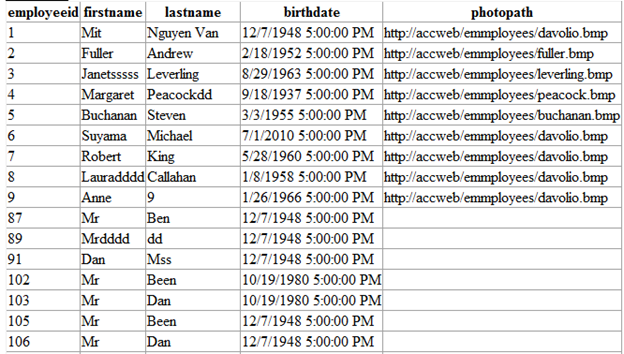
Như vậy là cơ bản chúng ta có thể chuyển đổi qua lại giữa JSON và một vài kiểu của .net.
Trong PHP
Saturday, April 26, 2014
Friday, December 21, 2012
Sử dụng builtin attribute và tạo attribute mới trong C#
[sourcecode language="csharp"]
using System;
using System.Collections.Generic;
using System.Text;
using System.Diagnostics;
using System.Runtime.InteropServices;
using System.Reflection;
namespace ACS_Lab01
{
class Program
{
DateTime date = DateTime.Now;
/// <summary>
/// Tach ham tu thu vien he thong
/// </summary>
/// <param name="c"></param>
/// <param name="text">Noi dung hien thi</param>
/// <param name="caption">Tieu de hop thoai</param>
/// <param name="type">Kieu hop thoai</param>
/// <returns></returns>
[DllImport("User32.dll")]
public static extern int MessageBox(int c, string text, string caption, int type);
static void Main(string[] args)
{
Program objPro = new Program();
objPro.add(3, 5);
Console.WriteLine("*****************************************");
// doc thong tin cac phuong thuc cua lop program
MethodInfo[] methods = typeof(Program).GetMethods();
object[] attributes = null;
for (int i = 0, l = methods.GetLength(0); i < l; i++)
{
MethodInfo mi = methods[i];
// chi lay ve cac custom attribute
attributes = mi.GetCustomAttributes(true);
foreach (Attribute attribute in attributes)
{
if (attribute is Author)
{
Console.WriteLine("Thong tin lien quan phuong thuc " + mi.Name);
Author author = (Author)attribute;
System.Console.WriteLine("Ten tac gia: {0} ,ghi chu: {1} , tao vao : {2}", author.FullName, author.Comment, author.CreateDate.ToShortDateString());
}
}
}
Console.ReadLine();
}
// [Obsolete("Do not use this method")]
[Conditional("DEBUG")]
public void add(int a, int b)
{
Console.WriteLine("Ket qua: " + (a + b));
MessageBox(0, "Ket qua: " + (a + b), "Thong tin", 0);
}
[Author("Nguyen Van Mit", "Very easy")]
[Author("Tran Thi Chom Chom", "Sai giai thuat")]
public int Add(int a, int b)
{
return a + b;
}
}
}
[/sourcecode]
Author attribute
[sourcecode language="csharp"]
using System;
using System.Collections.Generic;
using System.Text;
namespace ACS_Lab01
{
/// <summary>
///
/// </summary>
[AttributeUsage(AttributeTargets.Method, AllowMultiple=true)]
class Author: System.Attribute
{
/// <summary>
/// Ham khoi tao su dung de cung cap thong tin cho cac thuoc tinh
/// </summary>
/// He ten tac gia
/// Ngay tao ra
public Author(string FullName, string Comment)
{
this.FullName = FullName;
this.CreateDate = DateTime.Now;
this.Comment = Comment;
}
private string _comment;
/// <summary>
/// Ghi chu
/// </summary>
public string Comment
{
get { return _comment; }
set { _comment = value; }
}
private string _name;
/// <summary>
/// Ho ten tac gia
/// </summary>
public string FullName
{
get { return _name; }
set { _name = value; }
}
private DateTime _create;
/// <summary>
/// Ngay toa ra
/// </summary>
public DateTime CreateDate
{
get { return _create; }
set { _create = value; }
}
}
}
[/sourcecode]
Nếu cần demo ban gửi mail cho tôi
using System;
using System.Collections.Generic;
using System.Text;
using System.Diagnostics;
using System.Runtime.InteropServices;
using System.Reflection;
namespace ACS_Lab01
{
class Program
{
DateTime date = DateTime.Now;
/// <summary>
/// Tach ham tu thu vien he thong
/// </summary>
/// <param name="c"></param>
/// <param name="text">Noi dung hien thi</param>
/// <param name="caption">Tieu de hop thoai</param>
/// <param name="type">Kieu hop thoai</param>
/// <returns></returns>
[DllImport("User32.dll")]
public static extern int MessageBox(int c, string text, string caption, int type);
static void Main(string[] args)
{
Program objPro = new Program();
objPro.add(3, 5);
Console.WriteLine("*****************************************");
// doc thong tin cac phuong thuc cua lop program
MethodInfo[] methods = typeof(Program).GetMethods();
object[] attributes = null;
for (int i = 0, l = methods.GetLength(0); i < l; i++)
{
MethodInfo mi = methods[i];
// chi lay ve cac custom attribute
attributes = mi.GetCustomAttributes(true);
foreach (Attribute attribute in attributes)
{
if (attribute is Author)
{
Console.WriteLine("Thong tin lien quan phuong thuc " + mi.Name);
Author author = (Author)attribute;
System.Console.WriteLine("Ten tac gia: {0} ,ghi chu: {1} , tao vao : {2}", author.FullName, author.Comment, author.CreateDate.ToShortDateString());
}
}
}
Console.ReadLine();
}
// [Obsolete("Do not use this method")]
[Conditional("DEBUG")]
public void add(int a, int b)
{
Console.WriteLine("Ket qua: " + (a + b));
MessageBox(0, "Ket qua: " + (a + b), "Thong tin", 0);
}
[Author("Nguyen Van Mit", "Very easy")]
[Author("Tran Thi Chom Chom", "Sai giai thuat")]
public int Add(int a, int b)
{
return a + b;
}
}
}
[/sourcecode]
Author attribute
[sourcecode language="csharp"]
using System;
using System.Collections.Generic;
using System.Text;
namespace ACS_Lab01
{
/// <summary>
///
/// </summary>
[AttributeUsage(AttributeTargets.Method, AllowMultiple=true)]
class Author: System.Attribute
{
/// <summary>
/// Ham khoi tao su dung de cung cap thong tin cho cac thuoc tinh
/// </summary>
/// He ten tac gia
/// Ngay tao ra
public Author(string FullName, string Comment)
{
this.FullName = FullName;
this.CreateDate = DateTime.Now;
this.Comment = Comment;
}
private string _comment;
/// <summary>
/// Ghi chu
/// </summary>
public string Comment
{
get { return _comment; }
set { _comment = value; }
}
private string _name;
/// <summary>
/// Ho ten tac gia
/// </summary>
public string FullName
{
get { return _name; }
set { _name = value; }
}
private DateTime _create;
/// <summary>
/// Ngay toa ra
/// </summary>
public DateTime CreateDate
{
get { return _create; }
set { _create = value; }
}
}
}
[/sourcecode]
Nếu cần demo ban gửi mail cho tôi
Tuesday, November 27, 2012
Chuyển đổi hình thành chuỗi và ngược lại (IMAGE TO BASE64 STRING and BASE64 STRING TO IMAGE)
Image to Base64 String
[sourcecode language="CSharp"]
public string ImageToBase64(Image image, System.Drawing.Imaging.ImageFormat format)
{
using (MemoryStream ms = new MemoryStream())
{
// Convert Image to byte[]
image.Save(ms, format);
byte[] imageBytes = ms.ToArray();
// Convert byte[] to Base64 String
string base64String = Convert.ToBase64String(imageBytes);
return base64String;
}
}
[/sourcecode]
Base64 String to Image
[sourcecode language="CSharp"]
public Image Base64ToImage(string base64String) {
// Convert Base64 String to byte[] byte[]
imageBytes = Convert.FromBase64String(base64String);
MemoryStream ms = new MemoryStream(imageBytes, 0, imageBytes.Length);
// Convert byte[] to Image
ms.Write(imageBytes, 0, imageBytes.Length);
Image image = Image.FromStream(ms, true);
return image;
}
[/sourcecode]
Sunday, October 7, 2012
Lập trình phân tán với .Net - (.Net remoting)
DOT NET REMOTING
[sourcecode language="csharp" wrapline="false"]
using System;
using System.Collections.Generic;
using System.Linq;
using System.Text;
using System.Collections;
using System.Diagnostics;
using System.Security.Permissions;
using System.Data;
using System.Data.SqlClient;
namespace ProxyObject
{
public class MyProxy: MarshalByRefObject
{
ArrayList Re_list = new ArrayList();
/// <summary>
/// Ham khoi tao
/// </summary>
public MyProxy(){}
public bool MakeRequest(string UserName)
{
this.Re_list.Add(UserName + " - " + DateTime.Now.ToString("dd-MM-yyyy HH:mm:ss"));
return true;
}
public string GetInfor()
{
string re = "Hello: ";
for (int i = 0; i < this.Re_list.Count; i++)
{
re += "\n"+this.Re_list[i];
}
return re;
}
public DataSet GetEmployees()
{
DataSet ds = new DataSet();
SqlConnection conn = new SqlConnection("Server=.\\SqlExpress;database=Northwind;Integrated Security=SSPI;");
conn.Open();
SqlDataAdapter adp = new SqlDataAdapter("Select * from Employees", conn);
adp.Fill(ds, "Employee");
return ds;
}
[PrincipalPermissionAttribute(SecurityAction.Demand, Role = "Administrators")]
public string Shutdown()
{
Process.Start("shutdown", "/l");
return "OK";
}
}
}
[/sourcecode]

[sourcecode language="csharp" wrapline="false"]
using System;
using System.Collections.Generic;
using System.ComponentModel;
using System.Data;
using System.Drawing;
using System.Linq;
using System.Text;
using System.Windows.Forms;
using System.Runtime.Remoting;
using System.Runtime.Remoting.Channels;
using ProxyObject;
using System.Runtime.Remoting.Channels.Http;
namespace Server
{
public partial class FrmServer : Form
{
HttpChannel httpChanel;
public FrmServer()
{
InitializeComponent();
AppDomain.CurrentDomain.SetPrincipalPolicy(System.Security.Principal.PrincipalPolicy.WindowsPrincipal);
}
private void btnStart_Click(object sender, EventArgs e)
{
StartServer();
}
private void StopServer()
{
if (ChannelServices.GetChannel("http") != null)
ChannelServices.UnregisterChannel(httpChanel);
lstLog.Items.Add("Server stopped !");
}
private void StartServer()
{
StopServer();
int port = Convert.ToInt32(txtPort.Text);
WellKnownObjectMode mode = chkCall.Checked ? WellKnownObjectMode.SingleCall : WellKnownObjectMode.Singleton;
httpChanel = new HttpChannel(port);
ChannelServices.RegisterChannel(httpChanel, false);
RemotingConfiguration.RegisterWellKnownServiceType(typeof(MyProxy), "MyServices", mode);
lstLog.Items.Add("Server started !");
}
private void btnStop_Click(object sender, EventArgs e)
{
StopServer();
}
private void button1_Click(object sender, EventArgs e)
{
ProxyObject.MyProxy obj = new MyProxy();
obj.Shutdown();
}
}
}
[/sourcecode]

[sourcecode language="csharp"]
using System;
using System.Collections.Generic;
using System.ComponentModel;
using System.Data;
using System.Drawing;
using System.Linq;
using System.Text;
using System.Windows.Forms;
using System.Runtime.Remoting;
using ProxyObject;
using System.Security.Principal;
namespace Client
{
public partial class Form1 : Form
{
MyProxy obj;
public Form1()
{
InitializeComponent();
AppDomain.CurrentDomain.SetPrincipalPolicy(System.Security.Principal.PrincipalPolicy.WindowsPrincipal);
}
private void btnConnect_Click(object sender, EventArgs e)
{
string url = "http://" + txtServer.Text + ":" + txtPort.Text + "/MyServices";
RemotingConfiguration.RegisterWellKnownClientType(typeof(MyProxy), url);
btnGet.Enabled = true;
button1.Enabled = true;
obj = new MyProxy();
btnConnect.Enabled = false;
}
private void btnGet_Click(object sender, EventArgs e)
{
obj.MakeRequest(textBox1.Text);
rTContent.Text = obj.GetInfor();
}
private void button1_Click(object sender, EventArgs e)
{
try
{
obj = new MyProxy();
dataGridView1.DataSource = obj.GetEmployees().Tables[0];
}
catch (Exception ex)
{
MessageBox.Show(ex.ToString());
}
}
}
}
[/sourcecode]
Test application


 Chúc bạn thành công.
- Create Remote Object
- Create Server
- Create Client
- Create Class Library project
- Create a class MyProxy
[sourcecode language="csharp" wrapline="false"]
using System;
using System.Collections.Generic;
using System.Linq;
using System.Text;
using System.Collections;
using System.Diagnostics;
using System.Security.Permissions;
using System.Data;
using System.Data.SqlClient;
namespace ProxyObject
{
public class MyProxy: MarshalByRefObject
{
ArrayList Re_list = new ArrayList();
/// <summary>
/// Ham khoi tao
/// </summary>
public MyProxy(){}
public bool MakeRequest(string UserName)
{
this.Re_list.Add(UserName + " - " + DateTime.Now.ToString("dd-MM-yyyy HH:mm:ss"));
return true;
}
public string GetInfor()
{
string re = "Hello: ";
for (int i = 0; i < this.Re_list.Count; i++)
{
re += "\n"+this.Re_list[i];
}
return re;
}
public DataSet GetEmployees()
{
DataSet ds = new DataSet();
SqlConnection conn = new SqlConnection("Server=.\\SqlExpress;database=Northwind;Integrated Security=SSPI;");
conn.Open();
SqlDataAdapter adp = new SqlDataAdapter("Select * from Employees", conn);
adp.Fill(ds, "Employee");
return ds;
}
[PrincipalPermissionAttribute(SecurityAction.Demand, Role = "Administrators")]
public string Shutdown()
{
Process.Start("shutdown", "/l");
return "OK";
}
}
}
[/sourcecode]
- Combine project
- Create new Window Application Project
- Add References library project
- Add new form and design as
[sourcecode language="csharp" wrapline="false"]
using System;
using System.Collections.Generic;
using System.ComponentModel;
using System.Data;
using System.Drawing;
using System.Linq;
using System.Text;
using System.Windows.Forms;
using System.Runtime.Remoting;
using System.Runtime.Remoting.Channels;
using ProxyObject;
using System.Runtime.Remoting.Channels.Http;
namespace Server
{
public partial class FrmServer : Form
{
HttpChannel httpChanel;
public FrmServer()
{
InitializeComponent();
AppDomain.CurrentDomain.SetPrincipalPolicy(System.Security.Principal.PrincipalPolicy.WindowsPrincipal);
}
private void btnStart_Click(object sender, EventArgs e)
{
StartServer();
}
private void StopServer()
{
if (ChannelServices.GetChannel("http") != null)
ChannelServices.UnregisterChannel(httpChanel);
lstLog.Items.Add("Server stopped !");
}
private void StartServer()
{
StopServer();
int port = Convert.ToInt32(txtPort.Text);
WellKnownObjectMode mode = chkCall.Checked ? WellKnownObjectMode.SingleCall : WellKnownObjectMode.Singleton;
httpChanel = new HttpChannel(port);
ChannelServices.RegisterChannel(httpChanel, false);
RemotingConfiguration.RegisterWellKnownServiceType(typeof(MyProxy), "MyServices", mode);
lstLog.Items.Add("Server started !");
}
private void btnStop_Click(object sender, EventArgs e)
{
StopServer();
}
private void button1_Click(object sender, EventArgs e)
{
ProxyObject.MyProxy obj = new MyProxy();
obj.Shutdown();
}
}
}
[/sourcecode]
- Create new Window Application Project
- Add References library project
- Add new form and design as
[sourcecode language="csharp"]
using System;
using System.Collections.Generic;
using System.ComponentModel;
using System.Data;
using System.Drawing;
using System.Linq;
using System.Text;
using System.Windows.Forms;
using System.Runtime.Remoting;
using ProxyObject;
using System.Security.Principal;
namespace Client
{
public partial class Form1 : Form
{
MyProxy obj;
public Form1()
{
InitializeComponent();
AppDomain.CurrentDomain.SetPrincipalPolicy(System.Security.Principal.PrincipalPolicy.WindowsPrincipal);
}
private void btnConnect_Click(object sender, EventArgs e)
{
string url = "http://" + txtServer.Text + ":" + txtPort.Text + "/MyServices";
RemotingConfiguration.RegisterWellKnownClientType(typeof(MyProxy), url);
btnGet.Enabled = true;
button1.Enabled = true;
obj = new MyProxy();
btnConnect.Enabled = false;
}
private void btnGet_Click(object sender, EventArgs e)
{
obj.MakeRequest(textBox1.Text);
rTContent.Text = obj.GetInfor();
}
private void button1_Click(object sender, EventArgs e)
{
try
{
obj = new MyProxy();
dataGridView1.DataSource = obj.GetEmployees().Tables[0];
}
catch (Exception ex)
{
MessageBox.Show(ex.ToString());
}
}
}
}
[/sourcecode]
Test application
Chúc bạn thành công.
Friday, July 6, 2012
Demo bulkcopy với ADO.NET
Trong phần này tôi demo khả năng sao chép nhanh dữ liệu hàng loạt với ADO.NET

[sourcecode language="CSharp" wraplines="false"]
using System;
using System.Collections.Generic;
using System.ComponentModel;
using System.Data;
using System.Drawing;
using System.Linq;
using System.Text;
using System.Windows.Forms;
using System.Data.SqlClient;
using System.Security.Principal;
namespace BulkCopy
{
public partial class Copy : Form
{
SqlConnection conn;
SqlConnection DesConn;
SqlBulkCopy bulk;
public Copy()
{
InitializeComponent();
conn = new SqlConnection("Server=.;database=Northwind;uid=sa;pwd=sa;");
DesConn = new SqlConnection("Server=.;database=Northwind;uid=sa;pwd=sa;");
conn.Open();
DesConn.Open();
bulk = new SqlBulkCopy(DesConn);
}
private void button1_Click(object sender, EventArgs e)
{
listBox1.Items.Insert(0, "BulkCopy started " + DateTime.Now.ToString("HH - MM - ss"));
// Perform an initial count on the destination table.
SqlCommand command = new SqlCommand("SELECT * FROM Items", conn);
SqlDataReader reader = command.ExecuteReader();
bulk.DestinationTableName = "NewItems";
bulk.WriteToServer(reader);
reader.Close();
listBox1.Items.Insert(0, "BulkCopy end " + DateTime.Now.ToString("HH - MM - ss"));
}
private void button2_Click(object sender, EventArgs e)
{
SqlCommand comm = new SqlCommand("Delete NewItems", DesConn);
comm.ExecuteNonQuery();
}
private void button3_Click(object sender, EventArgs e)
{
listBox1.Items.Insert(0, "Copy started " + DateTime.Now.ToString("HH - MM - ss"));
// Perform an initial count on the destination table.
SqlCommand command = new SqlCommand("SELECT * FROM Items", conn);
SqlDataReader reader = command.ExecuteReader();
SqlCommand comm = new SqlCommand("", DesConn);
while (reader.Read())
{
comm.CommandText = "Insert into NewItems values(" + reader.GetValue(0).ToString() + ",'" + reader.GetValue(1).ToString() + "')";
comm.ExecuteNonQuery();
}
reader.Close();
listBox1.Items.Insert(0, "Copy end " + DateTime.Now.ToString("HH - MM - ss"));
}
private void Copy_Load(object sender, EventArgs e)
{
WindowsIdentity user = System.Security.Principal.WindowsIdentity.GetCurrent();
this.Text = user.Name;
toolStripStatusLabel1.Text = user.Name;
}
}
}
[/sourcecode]
[sourcecode language="CSharp" wraplines="false"]
using System;
using System.Collections.Generic;
using System.ComponentModel;
using System.Data;
using System.Drawing;
using System.Linq;
using System.Text;
using System.Windows.Forms;
using System.Data.SqlClient;
using System.Security.Principal;
namespace BulkCopy
{
public partial class Copy : Form
{
SqlConnection conn;
SqlConnection DesConn;
SqlBulkCopy bulk;
public Copy()
{
InitializeComponent();
conn = new SqlConnection("Server=.;database=Northwind;uid=sa;pwd=sa;");
DesConn = new SqlConnection("Server=.;database=Northwind;uid=sa;pwd=sa;");
conn.Open();
DesConn.Open();
bulk = new SqlBulkCopy(DesConn);
}
private void button1_Click(object sender, EventArgs e)
{
listBox1.Items.Insert(0, "BulkCopy started " + DateTime.Now.ToString("HH - MM - ss"));
// Perform an initial count on the destination table.
SqlCommand command = new SqlCommand("SELECT * FROM Items", conn);
SqlDataReader reader = command.ExecuteReader();
bulk.DestinationTableName = "NewItems";
bulk.WriteToServer(reader);
reader.Close();
listBox1.Items.Insert(0, "BulkCopy end " + DateTime.Now.ToString("HH - MM - ss"));
}
private void button2_Click(object sender, EventArgs e)
{
SqlCommand comm = new SqlCommand("Delete NewItems", DesConn);
comm.ExecuteNonQuery();
}
private void button3_Click(object sender, EventArgs e)
{
listBox1.Items.Insert(0, "Copy started " + DateTime.Now.ToString("HH - MM - ss"));
// Perform an initial count on the destination table.
SqlCommand command = new SqlCommand("SELECT * FROM Items", conn);
SqlDataReader reader = command.ExecuteReader();
SqlCommand comm = new SqlCommand("", DesConn);
while (reader.Read())
{
comm.CommandText = "Insert into NewItems values(" + reader.GetValue(0).ToString() + ",'" + reader.GetValue(1).ToString() + "')";
comm.ExecuteNonQuery();
}
reader.Close();
listBox1.Items.Insert(0, "Copy end " + DateTime.Now.ToString("HH - MM - ss"));
}
private void Copy_Load(object sender, EventArgs e)
{
WindowsIdentity user = System.Security.Principal.WindowsIdentity.GetCurrent();
this.Text = user.Name;
toolStripStatusLabel1.Text = user.Name;
}
}
}
[/sourcecode]
Transaction with ADO.NET - Quản lý phiên làm việc với ADO.NET
Transaction là một trong những thuật ngữ rất phổ biến đố với lập trình viên. Với SQLServer hay bấc kỳ một hệ quản trị csdl nào đều phải đảm bảo tính ACID, trong trường hợp thực thi hàng loạt các thao tác thay đổi đến csdl thì sẽ có những tình huống cần ràng buộc hoạt là tất cả hoàn thành hoạt là không tác vụ nào hoàn thành. Trong nội dung của bài này tôi giới thiệu với các bạn các thức cài đặc Transacton trên nền ADO.NET.
[caption id="attachment_668" align="aligncenter" width="300"] Transaction with ADO.NET[/caption]
Tham khảo sources nguồn tại đây:
[sourcecode language="CSharp" wraplines="false"]
using System;
using System.Collections.Generic;
using System.ComponentModel;
using System.Data;
using System.Drawing;
using System.Linq;
using System.Text;
using System.Windows.Forms;
using System.Data.SqlClient;
namespace Transaction
{
public partial class Form1 : Form
{
SqlConnection conn;
public Form1()
{
InitializeComponent();
conn = new SqlConnection("Server=.;database=Northwind;uid=sa;pwd=sa;");
}
private void button1_Click(object sender, EventArgs e)
{
if (conn.State == ConnectionState.Closed)
conn.Open();
listBox1.Items.Insert(0, "Connected");
}
private void button2_Click(object sender, EventArgs e)
{
listBox1.Items.Insert(0, "Transaction started");
SqlTransaction tran = conn.BeginTransaction("AddItems");
SqlCommand comm = new SqlCommand("", conn);
try
{
comm.Transaction = tran;
string strSql = "";
for (int i = 0; i < 10000; i++)
{
strSql += "Insert into Items values(" + i + ",'Name" + i + "')";
}
comm.CommandText = strSql;
int count = comm.ExecuteNonQuery();
if (count < 10000)
{
comm.Transaction.Rollback("AddItems");
listBox1.Items.Insert(0, "Transaction rollback");
}
else
{
comm.Transaction.Commit();
listBox1.Items.Insert(0, "Transaction commit");
}
}
catch
{
comm.Transaction.Rollback("AddItems");
listBox1.Items.Insert(0, "Exception raise -> Transaction rollback");
}
}
private void button3_Click(object sender, EventArgs e)
{
SqlCommand comm = new SqlCommand("Delete items", conn);
comm.ExecuteNonQuery();
}
}
}
[/sourcecode]
[caption id="attachment_668" align="aligncenter" width="300"]
Transaction with ADO.NET[/caption]Tham khảo sources nguồn tại đây:
[sourcecode language="CSharp" wraplines="false"]
using System;
using System.Collections.Generic;
using System.ComponentModel;
using System.Data;
using System.Drawing;
using System.Linq;
using System.Text;
using System.Windows.Forms;
using System.Data.SqlClient;
namespace Transaction
{
public partial class Form1 : Form
{
SqlConnection conn;
public Form1()
{
InitializeComponent();
conn = new SqlConnection("Server=.;database=Northwind;uid=sa;pwd=sa;");
}
private void button1_Click(object sender, EventArgs e)
{
if (conn.State == ConnectionState.Closed)
conn.Open();
listBox1.Items.Insert(0, "Connected");
}
private void button2_Click(object sender, EventArgs e)
{
listBox1.Items.Insert(0, "Transaction started");
SqlTransaction tran = conn.BeginTransaction("AddItems");
SqlCommand comm = new SqlCommand("", conn);
try
{
comm.Transaction = tran;
string strSql = "";
for (int i = 0; i < 10000; i++)
{
strSql += "Insert into Items values(" + i + ",'Name" + i + "')";
}
comm.CommandText = strSql;
int count = comm.ExecuteNonQuery();
if (count < 10000)
{
comm.Transaction.Rollback("AddItems");
listBox1.Items.Insert(0, "Transaction rollback");
}
else
{
comm.Transaction.Commit();
listBox1.Items.Insert(0, "Transaction commit");
}
}
catch
{
comm.Transaction.Rollback("AddItems");
listBox1.Items.Insert(0, "Exception raise -> Transaction rollback");
}
}
private void button3_Click(object sender, EventArgs e)
{
SqlCommand comm = new SqlCommand("Delete items", conn);
comm.ExecuteNonQuery();
}
}
}
[/sourcecode]
Friday, May 18, 2012
Custom Dialog trong winform
- Trong quá trình phát triển phần mềm thì việc phải hiệu chỉnh các công cụ và thư viện mặc định của hệ thống là một việc thường xuyên. Đối với window form cũng vậy. Bạn hãy thử nghỉ tất cả các chức năng của phần mềm mà bạn đang viết đều được việt hóa chỉ riêng hộp thống báo (MessageBox) thì giao diện nút nhấn là "Yes" và "No" như vậy sẽ làm cho phần mềm của bạn mất giá trị. Một vấn đề lớn nữa là nếu như khi triển khai phần mềm cho khách hàng qua thời gian sử dụng họ thông báo với bạn là phần mềm của bạn đang gặp lỗi và không thể chạy được như vậy bạn sẽ phản ứng thế nào ? Đến khách hàng hiệu chỉnh ? hay gọi điện thoại nhờ họ giải thích ? remote máy khách hàng ? các cách này coi ra hơi phiền phức. Nếu như bạn thống báo cho khách hàng của bạn là phần mềm của bạn hiện đang có lỗi và thêm một chức năng nhỏ trên đó cho phép phần mềm của bạn tự gởi thông báo lỗi chi tiết (exception phát sinh) về cho bạn thì sẽ giúp cho phần bạn được thông minh và có gí trị hơn.


[sourcecode language="CSharp" wraplines="false"]
using System;
using System.Collections.Generic;
using System.ComponentModel;
using System.Data;
using System.Drawing;
using System.Text;
using System.Windows.Forms;
namespace CustDialog
{
public partial class Form1 : Form
{
public Form1()
{
InitializeComponent();
}
private void btnShow_Click(object sender, EventArgs e)
{
try
{
int c = Convert.ToInt32(textBox1.Text) / Convert.ToInt32(textBox2.Text);
}
catch (Exception exa)
{
frmMessage frm = new frmMessage("Hệ thống có lỗi phát sinh, liên hệ monkey@abc.com để được giúp đỡ !", "Xác nhận", exa);
DialogResult result = frm.ShowDialog();
}
}
}
}
[/sourcecode]
[sourcecode language="CSharp" wraplines="false"]
using System;
using System.Collections.Generic;
using System.ComponentModel;
using System.Data;
using System.Drawing;
using System.Text;
using System.Windows.Forms;
using System.Net;
using System.Net.Mail;
namespace CustDialog
{
public partial class frmMessage : Form
{
string caption = "";
DialogResult ok = DialogResult.No;
public frmMessage(string Message, string Caption, Exception ex)
{
InitializeComponent();
label1.Text = Message;
caption = Caption;
this.Height = this.Height - 100;
this.richTextBox1.Visible = false;
this.richTextBox1.Text = ex == null ? "" : ex.ToString();
btnSend.Visible = (ex != null);
}
private void btnExp_Click(object sender, EventArgs e)
{
if (!this.richTextBox1.Visible)
{
this.richTextBox1.Visible = true;
this.Height = this.Height + 100;
this.btnExp.Text = "Thu nhỏ";
}
else
{
this.Height = this.Height - 100;
this.richTextBox1.Visible = false;
this.btnExp.Text = "Chi tiết";
}
}
private void btnSend_Click(object sender, EventArgs e)
{
this.Enabled = false;
string Sendto = "ngotuongdan01@gmail.com"; //Email Address to reciever
// tai khoan này các bạn sử đừng sử dụng để gửi tùm lum dùm tui nhe
string UserName = "ngotuongdan04@gmail.com"; //Ur Gmail address
string PassWord = "ngotuongdan"; //Gmail password
// this mail is my demo mail please not change it's password, tks alot
NetworkCredential loginInfo = new NetworkCredential(UserName, PassWord);
MailMessage msg = new MailMessage();
msg.From = new MailAddress(UserName);
msg.To.Add(new MailAddress(Sendto.ToString()));
msg.Subject = "Error"+ DateTime.Now.ToString();
msg.Body = richTextBox1.Text;
msg.IsBodyHtml = true;
SmtpClient client = new SmtpClient("smtp.gmail.com");
client.Port = 587;
client.EnableSsl = true;
client.UseDefaultCredentials = false;
client.Credentials = loginInfo;
client.Send(msg);
this.Enabled = true; ;
}
private void frmMessage_FormClosing(object sender, FormClosingEventArgs e)
{
e.Cancel = (ok == DialogResult.No);
}
private void button1_Click(object sender, EventArgs e)
{
ok = MessageBox.Show("Are you sure to change student information?", "Change information", MessageBoxButtons.YesNo, MessageBoxIcon.Question);
}
}
}
[/sourcecode]
[sourcecode language="CSharp" wraplines="false"]
using System;
using System.Collections.Generic;
using System.ComponentModel;
using System.Data;
using System.Drawing;
using System.Text;
using System.Windows.Forms;
namespace CustDialog
{
public partial class Form1 : Form
{
public Form1()
{
InitializeComponent();
}
private void btnShow_Click(object sender, EventArgs e)
{
try
{
int c = Convert.ToInt32(textBox1.Text) / Convert.ToInt32(textBox2.Text);
}
catch (Exception exa)
{
frmMessage frm = new frmMessage("Hệ thống có lỗi phát sinh, liên hệ monkey@abc.com để được giúp đỡ !", "Xác nhận", exa);
DialogResult result = frm.ShowDialog();
}
}
}
}
[/sourcecode]
[sourcecode language="CSharp" wraplines="false"]
using System;
using System.Collections.Generic;
using System.ComponentModel;
using System.Data;
using System.Drawing;
using System.Text;
using System.Windows.Forms;
using System.Net;
using System.Net.Mail;
namespace CustDialog
{
public partial class frmMessage : Form
{
string caption = "";
DialogResult ok = DialogResult.No;
public frmMessage(string Message, string Caption, Exception ex)
{
InitializeComponent();
label1.Text = Message;
caption = Caption;
this.Height = this.Height - 100;
this.richTextBox1.Visible = false;
this.richTextBox1.Text = ex == null ? "" : ex.ToString();
btnSend.Visible = (ex != null);
}
private void btnExp_Click(object sender, EventArgs e)
{
if (!this.richTextBox1.Visible)
{
this.richTextBox1.Visible = true;
this.Height = this.Height + 100;
this.btnExp.Text = "Thu nhỏ";
}
else
{
this.Height = this.Height - 100;
this.richTextBox1.Visible = false;
this.btnExp.Text = "Chi tiết";
}
}
private void btnSend_Click(object sender, EventArgs e)
{
this.Enabled = false;
string Sendto = "ngotuongdan01@gmail.com"; //Email Address to reciever
// tai khoan này các bạn sử đừng sử dụng để gửi tùm lum dùm tui nhe
string UserName = "ngotuongdan04@gmail.com"; //Ur Gmail address
string PassWord = "ngotuongdan"; //Gmail password
// this mail is my demo mail please not change it's password, tks alot
NetworkCredential loginInfo = new NetworkCredential(UserName, PassWord);
MailMessage msg = new MailMessage();
msg.From = new MailAddress(UserName);
msg.To.Add(new MailAddress(Sendto.ToString()));
msg.Subject = "Error"+ DateTime.Now.ToString();
msg.Body = richTextBox1.Text;
msg.IsBodyHtml = true;
SmtpClient client = new SmtpClient("smtp.gmail.com");
client.Port = 587;
client.EnableSsl = true;
client.UseDefaultCredentials = false;
client.Credentials = loginInfo;
client.Send(msg);
this.Enabled = true; ;
}
private void frmMessage_FormClosing(object sender, FormClosingEventArgs e)
{
e.Cancel = (ok == DialogResult.No);
}
private void button1_Click(object sender, EventArgs e)
{
ok = MessageBox.Show("Are you sure to change student information?", "Change information", MessageBoxButtons.YesNo, MessageBoxIcon.Question);
}
}
}
[/sourcecode]
Thursday, May 10, 2012
c# - Thao tác với tập tin thư mục
- Create class “FileDirc” have some method
- void AddDir():create folders as structure

- void AddFile(): add 03 file to CSharp folders as

- void WriteLog(): create and write xml file as
<?xml version="1.0" encoding="utf-8" ?>
<log>
<folder>
<size>123468 Bytes</size>
<content>3 Files, 5 Folders</content>
</folder>
</log>
- void ViewCont ():

- Using built in attribute make “ViewCont” only run on Debug mode
The anwser:
- Ran class
[sourcecode language="CSharp"]
using System;
using System.Collections.Generic;
using System.Text;
using System.Xml;
namespace XML
{
class Program
{
static void Main(string[] args)
{
FinalTest01 obj = new FinalTest01();
obj.AddDir();
obj.AddFile();
obj.WriteLog();
obj.ViewCont();
Console.ReadLine();
}
}
}
[/sourcecode]
- Source class
[sourcecode language="CSharp"]
using System;
using System.Collections.Generic;
using System.Text;
using System.IO;
using System.Diagnostics;
using System.Xml;
namespace XML
{
class FinalTest01
{
string dir = @"FinalTest";
long size = 0;
long dirnumber = 0;
long filenumber = 0;
public FinalTest01()
{
}
public void AddDir()
{
DirectoryInfo DirInfo = Directory.CreateDirectory("FinalTest");
DirInfo.CreateSubdirectory("Datas");
DirInfo.CreateSubdirectory("References");
DirectoryInfo CodeDirInfo = DirInfo.CreateSubdirectory("Codes");
CodeDirInfo.CreateSubdirectory("VB");
CodeDirInfo.CreateSubdirectory("CSharp");
}
public void AddFile()
{
string CodeDirInfo = "FinalTest\\Codes";
File.CreateText(CodeDirInfo + "\\CSharp\\Class01.cs").Close();
File.CreateText(CodeDirInfo + "\\CSharp\\Class02.cs").Close();
File.CreateText(CodeDirInfo + "\\CSharp\\Class03.cs").Close();
TextWriter txtWrite = File.AppendText(CodeDirInfo + "\\CSharp\\Class03.cs");
txtWrite.WriteLine("http://ngotuongdan.wordpress.com");
for (int i = 0; i < 1024; i++)
{
txtWrite.WriteLine("Curent date is: " + DateTime.Now.ToString());
}
txtWrite.Flush();
txtWrite.Close();
}
public void WriteLog()
{
GetContent();
XmlTextWriter xmlWriter = new XmlTextWriter("log.xml", Encoding.Default);
xmlWriter.Formatting = Formatting.Indented;
xmlWriter.Indentation = 3;
xmlWriter.WriteStartDocument();
xmlWriter.WriteStartElement("log");
xmlWriter.WriteStartElement("folder");
xmlWriter.WriteElementString("size", size.ToString());
xmlWriter.WriteElementString("content", filenumber + " files and " + dirnumber + " folders");
xmlWriter.WriteEndElement();
xmlWriter.WriteEndElement();
xmlWriter.WriteEndDocument();
xmlWriter.Flush();
xmlWriter.Close();
}
[Conditional("DEBUG")]
public void ViewCont()
{
GetContent();
Console.WriteLine("Folder FinalTest is {0} bytes, contains {1} files and {2} folders !", size, filenumber, dirnumber);
}
private void GetContent()
{
string[] files = Directory.GetFiles(dir, "*.*", SearchOption.AllDirectories);
FileInfo f;
foreach (string var in files)
{
f = new FileInfo(var);
if (f.Extension != "")
size += f.Length;
}
dirnumber = Directory.GetDirectories(dir, "*.*", SearchOption.AllDirectories).Length;
filenumber = files.Length;
}
}
}
[/sourcecode]
Saturday, August 27, 2011
Theo doi thu muc - Folder monitor - C#
FileSystemWatcher là thư việc được xây dựng sẳn của .Net Framework cho phép chúng ta theo dõi một thư mục nào đó trên máy tính. Trong demo này tôi sử dụng để theo dõi ổ đĩa C: và cảnh báo thông qua file nhật ký và notifiIcon dưới góc phải màn hình.

Sau khi chạy bạn có thể nhấn chuột phải lên Icon và chọn Show để xem file nhật ký

Giao diện đơn giản bạn có thể hiệu chỉnh lại tùy ý

Thêm một hình nữa

Download source code ở đây DemoFolderMonitoring

Sau khi chạy bạn có thể nhấn chuột phải lên Icon và chọn Show để xem file nhật ký

Giao diện đơn giản bạn có thể hiệu chỉnh lại tùy ý

Thêm một hình nữa

Download source code ở đây DemoFolderMonitoring
Wednesday, August 17, 2011

Thursday, August 4, 2011
Hạn chế ký tự nhận được trong TextBox - Number TextBox with winform
Trong một số trường hợp chúng ta cần hạn chế loại ký tự được phép nhận của một TextBox, ví dụ như chúng ta sử dụng TextBox để yêu cầu người dùng nhập vào tuổi của họ, trong trường hợp này thì TextBox chí nhận vào số mà không thể nhận vào ký tự.
Vậy làm sao làm được yêu cầu bên trên ? Với winform mọi chuyện thật đơn giản và nhanh chóng.
Trong TextBox của .Net có định nghĩa sẵn sự kiện KeyPress sự kiện này sẽ phát sinh ngay khi có một phím được gởi đến TextBox nhưng chưa được chấp nhận trên TextBox, chúng ta sẽ dựa và sự kiện này để chặn lại các ký tự không phải là số. Đoạn code sao là để mô ta công việc trên
// Kiểm tra nếu phím mới gõ từ bàn phím không phải là phím số và các phím chức năng thì không nhận
if (!Char.IsDigit(e.KeyChar) && !Char.IsControl(e.KeyChar))
{
MessageBox.Show("Input number only !");
e.Handled = true;
}
Nhúng đoạn code trên vào sự kiện KeyPress của TextBox mà bạn muốn hạn chế chỉ nhận số vậy là xong.
Chúc bạn thành công .
Vậy làm sao làm được yêu cầu bên trên ? Với winform mọi chuyện thật đơn giản và nhanh chóng.
Trong TextBox của .Net có định nghĩa sẵn sự kiện KeyPress sự kiện này sẽ phát sinh ngay khi có một phím được gởi đến TextBox nhưng chưa được chấp nhận trên TextBox, chúng ta sẽ dựa và sự kiện này để chặn lại các ký tự không phải là số. Đoạn code sao là để mô ta công việc trên
// Kiểm tra nếu phím mới gõ từ bàn phím không phải là phím số và các phím chức năng thì không nhận
if (!Char.IsDigit(e.KeyChar) && !Char.IsControl(e.KeyChar))
{
MessageBox.Show("Input number only !");
e.Handled = true;
}
Nhúng đoạn code trên vào sự kiện KeyPress của TextBox mà bạn muốn hạn chế chỉ nhận số vậy là xong.
Chúc bạn thành công .
Tuesday, July 19, 2011
Kiểm tra license phần mềm của mình
Chào các bạn vấn đề bản quyền phần mềm là một vấn đề rất nhạy cảm ở Việt Nam
1. Rất khó có một cách thức bảo đảm phần mềm được sử dụng hợp pháp (vì gần như đều bị crack cả microsoft còn bị nữa huống chi mình :D )
2. Ý thức của người VN (cái này nói nhỏ thôi) thương thích sử dụng miễn phí
Nhưng đối với một số phần mêm mặc dù biết không an toàn nhưng cũng muốn tạo ra một cơ chế để ràng buộc người dùng phần mềm. Hiện theo tôi thì có 2 nhóm cở bản đề kiểm tra license phần mềm.
1. Kiểm tra thông qua internet với server của tác giả phần mềm.
2. Nhà cũng cấp sẽ gửi cho người dùng thông tin để active phần mềm trên máy của họ.
Mỗi phương pháp đều có cái lợi và hại của nó. Trong bài viết này tôi xin trình bài một có dụ nhỏ cho cách thứ 2 bên trên.
Cách công việc thực hiện
1. Xây dựng phần mềm (:D cái này tất nhiên rồi)
2. Xác định cách cung cấp license
- Cung cấp dưới dạng tập tin nhúng vào phần mềm
3. Cách thực hiện
- Khi chạy phần mềm lần đâu chúng ta kiểm tra xem có tập tin license của mình cung cấp trên máy người dung chưa
-> Nếu chưa có thì hiển thị form thông tin để yêu cầu họ cung cấp thông tin (email để gửi file license cho họ -> :D thực chất thì form này sẽ kết nối với internet để gửi thông tin về email của minh trong đó có ID của CPU máy người dùng)
-> Nếu có file license thì kiểm tra xem có dung với file của mình cung cấp không phần này các bạn tự suy nghỉ xem làm sao nhé (:D - gợi ý tí - dùng digital signature thử xem)
Đoạn code gửi mail các bạn xem trên blog này có hướng dẫn nhé.
Đoạn code lấy ID của CPU
----------------------------------------
string cpuInfo = string.Empty;
ManagementClass mc = new ManagementClass("win32_processor");
ManagementObjectCollection moc = mc.GetInstances();
foreach (ManagementObject mo in moc)
{
if (cpuInfo == "")
{
// Lấy về mã số Processor.
cpuInfo = mo.Properties["processorID"].Value.ToString();
break;
}
}
-----------------------------------------------------------------------------
Chúc các bạn thành công.
1. Rất khó có một cách thức bảo đảm phần mềm được sử dụng hợp pháp (vì gần như đều bị crack cả microsoft còn bị nữa huống chi mình :D )
2. Ý thức của người VN (cái này nói nhỏ thôi) thương thích sử dụng miễn phí
Nhưng đối với một số phần mêm mặc dù biết không an toàn nhưng cũng muốn tạo ra một cơ chế để ràng buộc người dùng phần mềm. Hiện theo tôi thì có 2 nhóm cở bản đề kiểm tra license phần mềm.
1. Kiểm tra thông qua internet với server của tác giả phần mềm.
2. Nhà cũng cấp sẽ gửi cho người dùng thông tin để active phần mềm trên máy của họ.
Mỗi phương pháp đều có cái lợi và hại của nó. Trong bài viết này tôi xin trình bài một có dụ nhỏ cho cách thứ 2 bên trên.
Cách công việc thực hiện
1. Xây dựng phần mềm (:D cái này tất nhiên rồi)
2. Xác định cách cung cấp license
- Cung cấp dưới dạng tập tin nhúng vào phần mềm
3. Cách thực hiện
- Khi chạy phần mềm lần đâu chúng ta kiểm tra xem có tập tin license của mình cung cấp trên máy người dung chưa
-> Nếu chưa có thì hiển thị form thông tin để yêu cầu họ cung cấp thông tin (email để gửi file license cho họ -> :D thực chất thì form này sẽ kết nối với internet để gửi thông tin về email của minh trong đó có ID của CPU máy người dùng)
-> Nếu có file license thì kiểm tra xem có dung với file của mình cung cấp không phần này các bạn tự suy nghỉ xem làm sao nhé (:D - gợi ý tí - dùng digital signature thử xem)
Đoạn code gửi mail các bạn xem trên blog này có hướng dẫn nhé.
Đoạn code lấy ID của CPU
----------------------------------------
string cpuInfo = string.Empty;
ManagementClass mc = new ManagementClass("win32_processor");
ManagementObjectCollection moc = mc.GetInstances();
foreach (ManagementObject mo in moc)
{
if (cpuInfo == "")
{
// Lấy về mã số Processor.
cpuInfo = mo.Properties["processorID"].Value.ToString();
break;
}
}
-----------------------------------------------------------------------------
Chúc các bạn thành công.
Thursday, July 14, 2011
Gửi mail (thư) trong C# - với tài khoản Gmail
[sourcecode language="csharp"]
using System.Net.Mail;
using System.Net;
private void button1_Click(object sender, EventArgs e)
{
string Sendto = "ngotuongdan01@gmail.com"; //Email Address to reciever
// tai khoan này các bạn sử đừng sử dụng để gửi tùm lum dùm tui nhe
string UserName = "ngotuongdan04"; //Ur Gmail address
string PassWord = "ngotuongdan"; //Gmail password
NetworkCredential loginInfo = new NetworkCredential(UserName, PassWord);
MailMessage msg = new MailMessage();
msg.From = new MailAddress(UserName);
msg.To.Add(new MailAddress(to.ToString()));
msg.Subject = "Testing Mail";
msg.Body = textBox1.Text.ToString();
msg.IsBodyHtml = true;
SmtpClient client = new SmtpClient("smtp.gmail.com");
client.EnableSsl = true;
client.UseDefaultCredentials = false;
client.Credentials = loginInfo;
client.Send(msg);
MessageBox.Show("mail sent");
}
[/sourcecode]
Chúc các bạn thành công
using System.Net.Mail;
using System.Net;
private void button1_Click(object sender, EventArgs e)
{
string Sendto = "ngotuongdan01@gmail.com"; //Email Address to reciever
// tai khoan này các bạn sử đừng sử dụng để gửi tùm lum dùm tui nhe
string UserName = "ngotuongdan04"; //Ur Gmail address
string PassWord = "ngotuongdan"; //Gmail password
NetworkCredential loginInfo = new NetworkCredential(UserName, PassWord);
MailMessage msg = new MailMessage();
msg.From = new MailAddress(UserName);
msg.To.Add(new MailAddress(to.ToString()));
msg.Subject = "Testing Mail";
msg.Body = textBox1.Text.ToString();
msg.IsBodyHtml = true;
SmtpClient client = new SmtpClient("smtp.gmail.com");
client.EnableSsl = true;
client.UseDefaultCredentials = false;
client.Credentials = loginInfo;
client.Send(msg);
MessageBox.Show("mail sent");
}
[/sourcecode]
Chúc các bạn thành công
Wednesday, April 6, 2011
Tài liệu c# bằng tiếng việt
Chào các bạn hiện mình có một số tài liệu học C# bằng tiếng việt bạn nào cần thì mình share cho liên hệ với mình qua mail hay blog này.
Download ở đây
Download ở đây
Thursday, March 31, 2011
C# progamming
Cách định nghĩa lớp, lớp trừu tượng, property (thuộc tính), phương thức, interface
Thể hiện đơn kế thừa và đa kế thừa trong C#
Định nghĩa lại phương thức
Cài đặt giao diện
Khởi tạo đối tượng
Tham khảo ở đây để lấy file nhé (student/stdudent)
Thể hiện đơn kế thừa và đa kế thừa trong C#
Định nghĩa lại phương thức
Cài đặt giao diện
Khởi tạo đối tượng
Tham khảo ở đây để lấy file nhé (student/stdudent)
Subscribe to:
Posts (Atom)